
TL;DR
Listen free for 30 days with Audible
Thousands of audiobooks and originals — cancel anytime.
Start your free trialAs an affiliate, we earn on qualifying purchases.
Doorbell signalers turn a doorbell press into visual, vibrating, or remote alerts. The best system matches your hearing needs, home size, and tech setup, often combining multiple alert types for reliability.
Multi-modal systems—combining light, vibration, and phone alerts—offer the most reliable visitor notification.
Check your existing wiring, chime type, and home layout before choosing a system to avoid compatibility issues.
Test alert coverage in all your key areas after installation and periodically afterward.
Recent tech trends focus on smart notifications and customizable alerts, increasing flexibility but adding complexity.
Choose a system that fits your hearing level, living space, and daily routines for the best independence and safety.
A Guide to Doorbell Signalers for Hearing Loss
Doorbell signalers convert a visitor’s press into bright flashes, vibrations, amplified sound, or remote notifications. The best setup matches your hearing, home layout, routines, and technology—and combines more than one alert mode for dependable coverage.
Visual, tactile, audible, and connected notifications.
Combine at least two modes for stronger redundancy.
Test wherever you work, relax, sleep, or spend time outdoors.
Wired links and dedicated buttons usually beat sound detection.
How do you want the doorbell to reach you?
Your strongest option changes with the moment. A light works when it is visible; vibration travels with you; mobile alerts extend beyond the home. Layering them closes the gaps.
Flashing lights
A lamp, built-in strobe, or room receiver provides a clear visual cue without adding noise.
Best: active roomsVibration
Wearable pagers, wrist units, portable receivers, and bed shakers alert through touch.
Best: moving or sleepingAdjusted chimes
Higher volume, lower-frequency tones, and selectable sounds can help with partial hearing.
Best: mild hearing lossPhone & watch
Smart and video doorbells send alerts to mobile devices, including when you are away.
Best: remote awarenessVisual + vibration + mobile creates the broadest everyday coverage. Keep a local alert available so a Wi-Fi or phone-setting problem does not silence the whole system.
The trigger determines reliability
Direct activation creates a clear link between the visitor’s action and your alert. Indirect sensors offer flexibility, but introduce more opportunities for missed or false triggers.
| Detection method | Reliability | Installation | False-alert risk | Best fit |
|---|---|---|---|---|
| Existing wired doorbell | Very high | Moderate | Low | Permanent, dependable setup |
| Dedicated wireless button | High | Easy | Low | Renters and fast installation |
| Smart or video doorbell | High | Moderate | Low–medium | Remote alerts and visual ID |
| Door vibration sensor | Medium | Easy | Medium | Knocks or doors without wiring |
| Acoustic chime detection | Variable | Easy | Higher | When direct connection is unavailable |
Relative guide: These bars illustrate the typical reliability hierarchy described in the research, not laboratory percentages. Walls, interference, device quality, placement, and maintenance all affect real-world performance.
Follow your routine, room by room
One extremely bright receiver is rarely as useful as several well-placed alerts. Concrete, metal, appliances, distance, and multiple floors can all reduce wireless range.
Map activity zones
Mark the rooms and outdoor areas where alerts must be seen or felt.
Match each mode
Place visual alerts in sightlines and tactile alerts where they stay close.
Test the barriers
Trigger the system through closed doors, floors, walls, and busy appliances.
Retest routinely
Check batteries, pairing, Wi-Fi settings, receivers, and alert distinction.
A practical coverage map
Before installation
- Confirm doorbell voltage, transformer, wiring, and chime type.
- Check the stated range against your actual home layout.
- Verify smart-home, phone, watch, and Wi-Fi compatibility.
- Look for low-battery, status, and connection indicators.
- Confirm that more receivers or sensors can be added later.
- Choose controls and apps that are easy to see and operate.
There is no universal “best” signaler
The right setup is the one you consistently notice during real life—not simply the model with the longest feature list. Start with hearing needs, then account for space, routines, entrances, and technical comfort.
Sound + visual
An adjustable lower-frequency chime paired with a clear light may provide enough reinforcement.
- Test several tones and volume levels
- Position the light in the primary room
- Keep alerts distinct from other devices
Visual + tactile
Bright visual alerts and strong vibration provide coverage without depending on residual hearing.
- Use multiple receivers across floors
- Add a wearable or portable vibrating unit
- Include a bed shaker for nighttime
Expandable + remote
Multiple local receivers plus phone or smartwatch alerts extend awareness across and beyond the home.
- Check range through real barriers
- Retain an internet-independent local alert
- Plan for additional entrances
Build up the alert stack as needs increase
More modes = more redundancyNew convenience brings new dependencies
Wearable notifications
Phone and smartwatch alerts travel with the user, but depend on connectivity, permissions, charging, and notification settings.
Video identification
Video doorbells add visitor previews, recordings, and two-way conversation for more context and security.
Custom alert patterns
Different flash and vibration sequences can identify the front door, back door, telephone, or other household event.
Accessible controls
Large labels, strong contrast, simple pairing, and clear app interfaces help users with varied vision, dexterity, or cognitive needs.
What types of alerts will make sure you never miss a visitor?
Doorbell signalers come in four main flavors: flashing lights, vibrating devices, loud or customizable chimes, and smart notifications. Flashing lights are perfect when you want a visual cue, like a bright strobe or blinking lamp. Vibrating receivers gently shake or pulse, ideal if you’re moving around or sleeping. Loud or adjustable chimes can supplement other alerts but might not be enough alone for profound hearing loss. Smart alerts send notifications straight to your phone or smartwatch, giving you remote awareness.
Many systems combine these modes—think flashing lights with vibrating pads and app alerts—covering all bases. Choosing the right combination ensures you’re alerted in the most effective way, considering your daily routines and environment. For example, if you sleep heavily, vibrations or visual alerts might be more reliable than sound. If you’re often in noisy environments, visual cues become even more critical. Tailoring your alert modes to your lifestyle maximizes safety and reduces the risk of missing visitors.
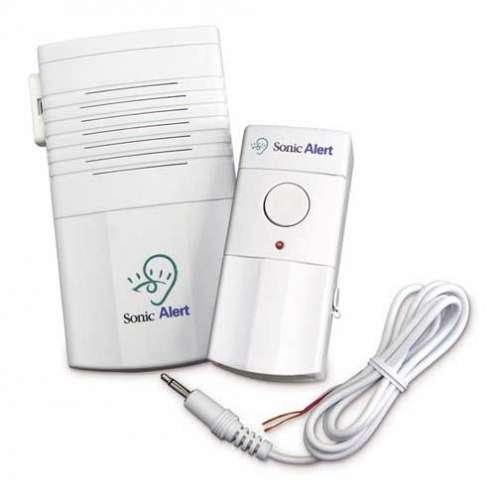
DB100 Wireless Doorbell Signaler/Transmitter
As an affiliate, we earn on qualifying purchases.
As an affiliate, we earn on qualifying purchases.
How do these systems detect visitors — and which is most reliable?
Doorbell signalers activate through various detection methods: a dedicated wireless button, connection to your existing wired chime, vibration sensors on the door, or acoustic detection of the chime or knock. Direct connection to a wireless or wired doorbell tends to be the most dependable because it directly links the visitor’s press to your alert system, minimizing false alarms caused by environmental noise. Acoustic sensors listen for sounds like chimes or knocks but can be unreliable if background noise is loud or if the sensor misinterprets other sounds—leading to missed alerts or false triggers.
Choosing a detection method depends on your home setup; wired connections generally provide consistent reliability, but wireless systems offer flexibility and easier installation. The tradeoff is that wireless sensors might be more susceptible to interference or range issues. For high reliability, systems that connect directly to your existing wiring or have dedicated transmitters are preferable, especially in larger or more complex homes where false alarms could be disruptive or missed alerts dangerous. Understanding these differences helps you select a system that ensures visitors are always noticed, no matter your home’s layout or environment.

CallToU Hearing Impaired Doorbell 1000FT Wireless Battery Operated Door Bell With Vibrating Flashing Light Avoid Scare Others for Deaf at Home Office 2 Call Buttons 2 Portable Receivers
- Portable Design: Back clip for belt or pocket use
- Multiple Notification Modes: Four modes including vibration and flashing light
- Adjustable Volume: Five volume levels up to 110dB
As an affiliate, we earn on qualifying purchases.
As an affiliate, we earn on qualifying purchases.
Where should your alerts be visible or felt around your home?
Coverage depends on your home layout and daily activity zones. Think about living rooms, kitchens, bedrooms, bathrooms, basements, garages, or gardens.
Wireless range varies; walls, metal, concrete, and appliances can weaken signals. For large or multi-story homes, expandable systems with multiple receivers work best, ensuring alerts reach every corner.
For example, a person in a two-story house might install visual receivers on each level and a portable vibrating pad in the bedroom. Testing alert performance in different rooms ensures you won’t miss visitors, no matter where you are. Proper placement is crucial: visual alerts should be in your line of sight, and vibrating devices should be close enough to wake or alert you effectively. Considering your daily routines and movement patterns allows you to plan an alert system that provides comprehensive coverage, reducing the risk of missed visitors or emergencies.

Wireless Doorbell 1200Ft Door Bells for Home with Flashing Light Hearing Impaired Door bell 1 Battery Button & 3 Plug in Receivers for Home Classroom Room Office
- Wireless Doorbell Kit: 1 button with 3 receivers
- Waterproof & Dustproof: Durable for various environments
- High Sensitivity Button: Lights up when activated
As an affiliate, we earn on qualifying purchases.
As an affiliate, we earn on qualifying purchases.
What should you check before installing your doorbell signaler?
Compatibility is key. Confirm your existing doorbell wiring, voltage, chime type, and whether the system supports your smart-home platform.
Installation options include plug-in receivers, battery-powered units, or hardwired systems—pick what suits your DIY comfort and home setup.
Reliability features like low-battery alerts, connection indicators, and test functions prevent surprises. Also, consider expandability—can you add more receivers or sensors later? Planning ahead saves headaches and ensures your system keeps working smoothly. Additionally, check user reviews and manufacturer support to gauge long-term reliability. Compatibility with your smart home devices can enhance convenience but may introduce complexity—balance these factors based on your comfort level and needs.
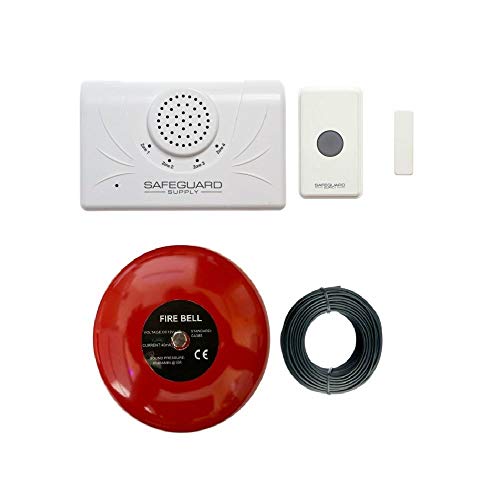
Safeguard Supply Door Alarm for Business When Entering – Loud 6” Alarm Bell
- Loud 6-inch Alarm Bell: Clear audible notification in noisy environments
- Multi-Function Transmitter: Acts as push button or magnetic door sensor
- Long Transmission Range: Operates up to 4000 feet
As an affiliate, we earn on qualifying purchases.
As an affiliate, we earn on qualifying purchases.
How do you pick the best system for your needs?
Use a simple checklist:
- Alert modes (light, vibration, sound, app)
- Home size and range
- Number of entrances and receivers needed
- Preferred alert style—visual, tactile, or remote
- Compatibility with existing devices
- Budget for initial setup and ongoing costs
Evaluating these factors helps you avoid overspending on features you don’t need or missing critical coverage. For example, a large house with multiple entrances benefits from a system with extensive range and expandability, while a small apartment may only need a basic visual alert. Consider future needs—will your household grow or change?—and plan accordingly. Comparing features side-by-side provides clarity, ensuring you select a system that offers the best balance of reliability, convenience, and cost-effectiveness for your specific situation.
Latest trends making doorbell alerts smarter and more flexible
Recent innovations focus on connectivity and customization. Smart notifications now pop up on phones and smartwatches, so you’re alerted even if you’re not near the front door.
Video doorbells offer visual ID, recordings, and two-way chat, adding layers of safety.
Customizable lights, flash patterns, and vibration sequences help you tailor alerts to your preferences.
These advances make the system more adaptable but also add complexity—so check compatibility and test thoroughly. While these features enhance convenience and security, they also require a good understanding of your devices and network to avoid connectivity issues that could compromise alerts. The trend toward smarter systems encourages more personalized experiences but emphasizes the importance of proper setup and ongoing maintenance to ensure consistent performance.
Matching your system to your specific needs
For someone with mild hearing loss, a flashing light plus a lower-volume chime might suffice. The user should test several tones to find what’s easily heard.
For severe loss, a combination of bright visuals and strong vibrations works best, often with multiple receivers.
Nighttime users benefit from wearable bed shakers that wake you with gentle pulses, especially if facing away from lights.
Large homes need expandable systems with receivers on each floor—test each location after setup.
Renters prefer wireless or plug-in options; permanent installations may not be allowed.
People away often choose smart systems with phone alerts, but internet reliability is critical.
Shared households benefit from individual wearables or adjustable alerts to avoid disturbing everyone. Tailoring your system to your specific hearing profile, home environment, and lifestyle ensures maximum independence and safety, allowing you to respond promptly to visitors or emergencies without unnecessary stress or missed alerts.
Easy steps to set up and test your system
Follow these tips for reliable alerts:
- Position visual receivers where you see them daily.
- Place vibrating devices close to where you sleep or move around.
- Test each alert at every entrance and room.
- Use different alert patterns for front and back doors.
- Regularly check batteries and connections.
- Retest after moving furniture, updating your Wi-Fi, or changing notification settings.
- Keep a backup alert method for important visitors.
Proper setup ensures you won’t miss a visitor and keeps your system working smoothly over time. Regular testing and maintenance are crucial because environmental changes or device wear can reduce effectiveness. Ensuring your alerts are correctly placed and functioning aligns with your daily routines, so you remain aware of visitors or emergencies at all times. Incorporating backup methods adds an extra layer of security, especially during power outages or device failures.
Frequently Asked Questions
What is a doorbell signaler?
A doorbell signaler is a device that converts a doorbell press or knock into a visual, vibrating, or remote alert, helping people with hearing loss notice visitors easily.What is the best doorbell signaler for hearing loss?
The best system depends on your hearing level, home size, and lifestyle. Multi-modal, expandable systems that combine lights, vibrations, and app notifications tend to offer the most reliable coverage.Can I connect a signaler to my existing doorbell?
Yes, often. Compatibility depends on your doorbell wiring, voltage, and chime type. Some transmitters connect directly, while others detect the chime’s sound or vibration.Do I need a video doorbell?
Not necessarily. A simple wireless button with visual or vibrating receivers can be enough. Video adds visitor identification and remote access but isn’t essential for alerting.Will a smart doorbell work without Wi-Fi?
Some will ring a wired chime without Wi-Fi, but most smart features—notifications, video, recordings—depend on internet access. Check your device’s requirements.Conclusion
A well-chosen doorbell signaler becomes a reliable bridge between you and your visitors—never again missing a knock or ring. Think about your home, your hearing, and your daily habits when selecting a system. With the right setup, your home transforms into a space where independence and security go hand in hand.Imagine the comfort of knowing every visitor is noticed—making your home truly accessible, no matter your hearing ability.
Summer Picks
summer essentials
As an affiliate, we earn on qualifying purchases.