TL;DR
Listen free for 30 days with Audible
Thousands of audiobooks and originals — cancel anytime.
Start your free trialAs an affiliate, we earn on qualifying purchases.
Selecting a simple phone for cognitive support means prioritizing ease of use, safety features, and customization. Recent trends include voice control, remote management, and smart integrations, making these devices more accessible than ever.
Prioritize large, clearly labeled buttons and simple interfaces for ease of use.
Design features like high contrast screens and durable builds improve safety and comfort.
Key features such as emergency buttons, customizable contacts, and voice control boost independence.
Latest trends focus on voice-activated commands, remote management, and smart integrations.
Test the device in real-world scenarios to ensure it fits the user’s daily needs and environment.
How to Choose a Simple Phone for Cognitive Support
A supportive phone should reduce decisions, make help easy to reach, and remain dependable in the places where it will actually be used. The best choice is not necessarily the cheapest or smartest device—it is the one the user can operate calmly and consistently.
Essential actions should be visible, familiar, and reachable without navigating complex menus.
A dedicated emergency button or dependable one-touch contact is easier to use under stress.
Try calling, charging, finding contacts, and responding to an alert in the user’s normal environment.
Start with the person, not the specification sheet
Memory, vision, hearing, dexterity, routine, and living environment all influence what “simple” means. Look for a device that removes friction from the user’s most common actions while preserving a reassuring sense of independence.
Make every action obvious
Choose large, clearly labeled controls, strong contrast, and a home screen limited to essential functions. Calling, messages, and emergency help should never be buried.
Balance grip and weight
A substantial body can feel steadier, while an ultra-light phone is easier to carry. Test whether the device can be held, unlocked, and used without strain.
Design for quick recognition
High contrast, adjustable text, bright casing, and a clear display make the phone easier to read—and easier to find when it is misplaced.
Put help within one press
Favor a dedicated emergency control, favorite contacts, visual alerts, and distinct ringtones. Avoid emergency features that require several steps.
Adapt without adding clutter
Pre-program familiar contact names, enlarge text carefully, adjust volume, and store medical information. More customization is useful only when it makes choices clearer.
Check power and coverage
Seek multi-day battery life and verify carrier compatibility at home and in frequently visited places—especially where network coverage is uneven.
A feature is only supportive when the user can recognize it, reach it, and activate it reliably—particularly during confusion or stress.
Weight the features by daily impact
This qualitative priority map emphasizes the elements most likely to affect routine use and safety. Adjust the balance for the individual rather than treating every capability as equally important.
Find the usable middle
Extremes can create new problems. Test the tradeoff rather than assuming more—or less—is automatically better.
Evaluate visibility in daylight, audibility in a busy room, grip while seated or walking, and signal quality in the places the user spends the most time.
What to inspect before buying
Use observable criteria rather than marketing terms. “Senior-friendly” or “simple” should translate into controls, settings, and support that can be demonstrated in a realistic task.
| Feature | Why it matters | Strong evidence | Warning sign |
|---|---|---|---|
| Large buttons and display | Reduces visual and motor effort during routine calls. | Buttons around 10mm+, clear labels, strong contrast | Tiny controls or essential actions hidden behind repeated taps |
| Emergency access | Enables faster contact with a caregiver or emergency service. | Dedicated one-touch button with clear feedback | Activation requires menus, codes, or several confirmations |
| Favorite contacts | Limits searching and supports familiar recognition. | Short list using names or photos the user recognizes | Long, editable lists that are easy to reorder accidentally |
| Alerts and volume | Makes incoming calls and reminders easier to notice. | Adjustable sound, vibration, and visual indicators | Only one harsh volume level or confusing alert tones |
| Battery and charging | Reduces the risk of the phone being unavailable. | Two to three days of typical use; simple charging dock | Frequent charging or a small connector that is difficult to align |
| Caregiver controls | Allows trusted support without rebuilding the setup in person. | Secure remote settings with consent and clear permissions | Unclear access, weak security, or settings that change silently |
Tip / Confirm network compatibility and coverage before relying on any emergency feature.
Simple phones are becoming quietly smarter
Recent developments add assistance behind a simplified interface. The goal is not to expose more technology, but to reduce physical effort, provide earlier warnings, and make caregiver support easier.
Spoken commands
Calling or sending a message by voice can help users with limited dexterity or difficulty navigating controls.
Caregiver setup
Trusted family members can maintain contacts or settings without being physically present.
Safety alerts
Fall detection or inactivity alerts may notify trusted contacts when unusual patterns are detected.
Smart-home links
Compatible systems may activate lights, issue reminders, or extend emergency alerts through the home.
Location tracking, remote access, and automatic monitoring can improve safety, but they should be enabled transparently, secured carefully, and aligned with the user’s preferences.
Turn individual needs into a confident choice
A short, repeatable evaluation creates a clearer link between the user’s challenges, the selected features, and the real-world outcome the phone is meant to support.
Observe
Note difficulties with memory, vision, hearing, grip, charging, or navigation.
Prioritize
Choose the three daily actions that must remain easy and reliable.
Configure
Set contacts, text size, volume, emergency access, and permissions.
Rehearse
Practice calls, alerts, charging, and getting help in familiar surroundings.
Review
Watch for confusion or missed alerts and simplify the setup further if needed.
Can the user do this without prompting?
Training and repetition are essential. A good phone becomes genuinely supportive when its most important actions remain familiar over time.
Recognize the alert and respond using one clear control.
Reach a familiar person without searching through menus.
Activate assistance quickly and understand that it worked.
Connect or dock the phone with minimal alignment or handling.
Hear, see, or feel notifications without being startled.
Spot its color and usual storage place in the home environment.
How to Find a Phone That’s Easy to Use Every Day
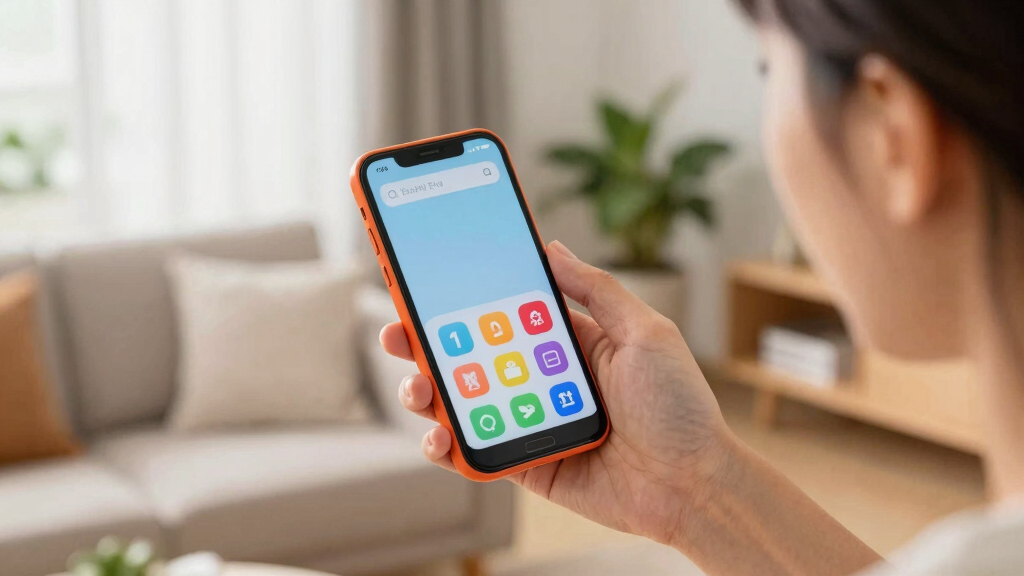
Ease of use is the foundation. Look for phones with large, clearly labeled buttons—think numbers that are easy to see and press. The interface should be simple, with only essential functions like calling, messaging, and emergency contacts.
Picture a senior with trembling hands trying to navigate a cluttered touchscreen. A minimalist layout with big icons makes all the difference. Test the phone yourself or watch a demo to see how intuitive it feels.
Tip: Devices with physical buttons for volume and emergency calls save frustration. Avoid complex menus or tiny screens that require multiple taps to reach basic functions.

artfone A400 Big Button Cell Phone for Seniors, 4G LTE Unlocked Phones, SOS Button, 2MP Camera, Charging Dock, 3 Slots, Speed Dial, Volume Boost, Large Fonts, Voice Time, Dumb Phone, 1800mAh – Silver
- Network Compatibility: Supports 2G/3G/4G LTE networks, T-Mobile compatible
- Hearing Assistance: Built-in microphone amplifies surrounding voices
- Large Button Design: Big, raised, backlit keypad for easy dialing
As an affiliate, we earn on qualifying purchases.
As an affiliate, we earn on qualifying purchases.
What Design Features Make a Phone Safer and More Comfortable
Design matters. Choose a phone that fits comfortably in your hand—think about weight and grip. A larger screen with high contrast makes reading easier, especially in bright sunlight or for users with visual impairments.
Imagine someone dropping their phone—durability counts. Look for models with sturdy build quality or shock-absorbing cases. Bright colors, like cherry red or vibrant blue, can make the device easier to find if misplaced.
Practical example: A caregiver might keep a bright red phone on a kitchen counter, knowing it’s easy to spot in a cluttered space.
Deep insight: When selecting a durable, well-designed phone, consider the tradeoff between weight and portability. Heavier phones might feel more substantial and easier to grip, but they can be cumbersome for daily use. Conversely, ultra-light models might be easier to carry but less sturdy, so balance your priorities based on the user’s environment and physical condition.
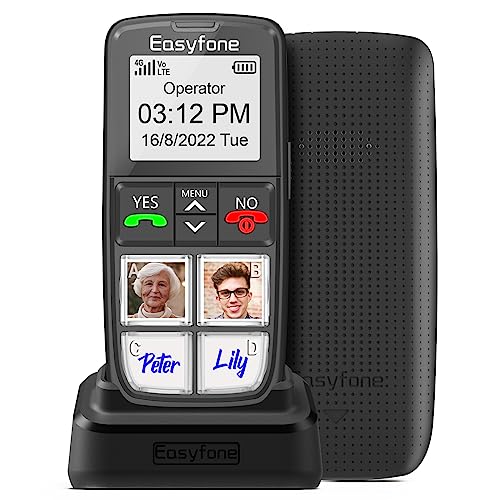
Easyfone Prime-T6 4G Picture Button Cell Phone for Seniors | Easy-to-use | Clear Sound | SOS Button | Easy Charging Dock | SIM Card Included | Suitable for Dementia, Alzheimer's and Kids
- Large Picture Memory Buttons: Easy calling without searching phonebook
- Simple Operating System: Minimalist UI for easy use
- 1050mAh Battery & Dock: Long standby and easy charging
As an affiliate, we earn on qualifying purchases.
As an affiliate, we earn on qualifying purchases.
Key Features That Boost Safety and Independence
Prioritize features that support quick help and clear communication. An emergency button or quick-dial list can be a literal lifesaver—think of pressing one button to call a caregiver or emergency services.
Visual alerts like flashing lights or loud, distinct ringtones help users notice calls or messages. Simplified contact lists with favorite numbers ensure quick access during stressful moments.
Example: A person with memory issues can set their child’s number as the first contact, so it’s always just one press away.
Deep understanding: The effectiveness of these safety features depends on the user’s familiarity and ease of access. For example, an emergency button that requires multiple steps to activate might be confusing during a crisis. Therefore, opting for a dedicated, one-touch emergency button is often more reliable. Additionally, consider the implications of overly loud alarms—they can startle or cause discomfort, so adjustable volume controls are important for personalized safety.

Answer – Hang-up – Call – with Only Your Voice – Handsfree Hands Free
- Voice-Activated Dialing: Dial numbers using voice commands
- Voice Hang-Up: End calls with voice commands
- Answer Calls Voice-Activated: Answer incoming calls using voice
As an affiliate, we earn on qualifying purchases.
As an affiliate, we earn on qualifying purchases.
How to Personalize a Phone for Maximum Support
Customizing a device makes a big difference. Many simple phones allow you to enlarge fonts and increase volume—crucial for those with visual or hearing challenges. Pre-program emergency contacts and medical info keeps vital details accessible.
Imagine setting up a phone where the home screen shows only three icons: Call, Messages, and Emergency. Less clutter reduces confusion and accidental calls.
Tip: Use simple labels like ‘Mom,’ ‘Doctor,’ or ‘Emergency’ to help users quickly identify contacts.
Deep insight: Personalization isn’t just about aesthetics; it directly impacts usability and safety. For instance, enlarging fonts can reduce frustration and errors for users with visual impairments, but excessively large text may clutter the screen and reduce available space. Similarly, pre-programmed emergency contacts streamline access but require careful setup to ensure the correct numbers are stored and easily identifiable. Balancing simplicity with comprehensive support creates a more effective, user-friendly device.
Easyfone Prime-T6 4G Picture Button Cell Phone for Seniors | Easy-to-use | Clear Sound | SOS Button | Easy Charging Dock | SIM Card Included | Suitable for Dementia, Alzheimer's and Kids
- Large Picture Memory Buttons: Easy calling without searching phonebook
- Simple Operating System: Minimalist UI for easy use
- 1050mAh Battery & Dock: Long standby and easy charging
As an affiliate, we earn on qualifying purchases.
As an affiliate, we earn on qualifying purchases.
Battery Life and Connectivity You Can Trust
A reliable phone needs long-lasting power. Look for models with at least 2-3 days of battery life—the last thing you want is a dead device during an emergency.
Test the connection—good coverage means fewer dropped calls. For those living in rural areas or with spotty service, check compatibility with your carrier beforehand.
Example: A caregiver notices their loved one’s phone lasts a full weekend without charging, making it easier to avoid daily fuss over recharging.
Deep explanation: Battery life and connectivity are critical because they directly influence safety and reliability. A phone with a short battery life may require frequent recharging, which can be forgotten or neglected, leading to potential safety risks. Similarly, poor connectivity can prevent emergency calls from going through when needed most. When evaluating devices, consider not only the battery capacity but also the quality of the network compatibility, especially in areas with known coverage issues. Investing in a device with robust connectivity ensures peace of mind and continuous support for the user.
Latest Trends Making Simple Phones Smarter and Safer
Recent innovations focus on making phones more accessible. Voice-activated commands let users dial, send messages, or get help just by speaking. Some models now connect to smart home devices for added safety, like turning on lights or alerting caregivers.
Automatic emergency alerts are gaining traction—some phones can detect falls or unusual inactivity and notify loved ones immediately.
Remote management tools let caregivers set up or monitor the device without being physically present, reducing stress and simplifying support.
Deep insight: These trends reflect a shift toward integrating basic safety with advanced technology to enhance independence. Voice control reduces the need for physical interaction, which is crucial for users with motor difficulties. Fall detection and inactivity alerts provide proactive safety measures, but they also raise privacy considerations—it’s vital to choose systems that balance safety with user consent. Remote management offers convenience but requires secure, user-friendly interfaces to prevent accidental misconfigurations or privacy breaches. Understanding these implications helps caregivers and users make informed decisions about adopting such technologies.
Comparison Table: Features to Look for in a Simple Phone
| Feature | Why It Matters | Example |
|---|---|---|
| Large buttons and display | Easy to see and press, reduces frustration | Button size over 10mm, high contrast screen |
| Emergency button | Quick access during crises | One-touch call to emergency services |
| Long battery life | Less charging, more reliability | At least 2-3 days on a single charge |
| Customizable contacts | Saves time and confusion | Favorite contacts pre-set, labeled clearly |
| Voice control | Reduces manual navigation | Say ‘Call Mom’ to dial without touching |
Frequently Asked Questions
What features are most important for someone with memory problems?
Look for large buttons, an emergency SOS button, customizable quick-dial contacts, and clear visual alerts. These features make it easier to stay connected and safe without overwhelming the user.Are simple phones affordable and still safe?
Yes, many basic phones cost less than $50 and include essential safety features like emergency calling and loud ringtones. Investing in a reliable device can significantly enhance safety without breaking the bank.How difficult is it to set up one of these phones?
Setup usually involves programming a few contacts, adjusting volume and font size, and placing emergency buttons. Many models come with straightforward instructions or caregiver support to simplify the process.Can these phones support visual or hearing impairments?
Absolutely. Look for models with adjustable font sizes, high-contrast screens, and loud, clear ringtones. Some phones also offer vibrating alerts and compatibility with hearing aids.What’s the best way to train a new user?
Start with simple, repetitive exercises: show how to make calls, use emergency buttons, and recognize notifications. Keep instructions brief and in visual or tactile formats as needed, and practice regularly.Conclusion
Choosing a simple phone isn’t just about fewer features — it’s about creating a dependable tool that supports independence and safety. Think of it as a trusted companion, ready to help at a moment’s notice. When in doubt, pick the device that feels intuitive and reassuring, because that’s the one that truly makes a difference.College move-in / dorm season Picks
dorm essentials
As an affiliate, we earn on qualifying purchases.