
TL;DR

Get everyday helpers delivered free with Prime
- Fast, free delivery on millions of items
- Prime Video, Amazon Music and more included
- Member-only deals all year
For long sitting, ergonomic support, adjustability, and breathable materials are key. Modern seating tech and movement breaks help prevent pain and health risks. Pick wisely for comfort and well-being.
Choose chairs with adjustable lumbar support, height, and armrests to fit your body perfectly.
Incorporate movement every 30-60 minutes—stand, stretch, or walk for at least 5 minutes.
Modern ergonomic chairs with dynamic support and cooling cushions can drastically improve comfort.
Alternating between sitting and standing helps prevent health issues linked to prolonged sitting.
Consistent awareness and small adjustments keep your posture healthy during long sitting sessions.
Comfortable Seating Solutions for Long Sitting
All-day comfort is not about finding the softest chair. It comes from supportive geometry, body-specific adjustments, breathable materials, and a routine that keeps you moving.
Support first. Softness second.
A good long-sitting chair behaves like tailored equipment: it supports the spine’s curves, spreads pressure, and adjusts as your body and activity change.
Lumbar support
Maintains the lower back’s inward curve, limits slouching, and reduces the load carried by muscles, discs, and ligaments.
Seat height
Lets feet rest flat with thighs near parallel to the floor, improving circulation and reducing pressure around knees and hips.
Seat depth
Supports the thighs without pressing behind the knees. A small gap at the seat edge helps preserve blood flow.
Armrest control
Supports relaxed shoulders and neutral forearms, reducing neck tension while helping the torso stay upright.
Breathable surface
Mesh, ventilated upholstery, and cooling foams control heat and moisture during demanding work or gaming sessions.
Stable mobility
A swivel base and floor-appropriate casters let you reach nearby tools without twisting or straining the spine.
What earns a place on the shortlist?
Judge each feature by the physical problem it solves. A chair is only ergonomic when its adjustments can be fitted correctly to its user.
| Feature | Posture value | Comfort value | Long-session priority | Fit check |
|---|---|---|---|---|
| Adjustable lumbar | ✓ High | ✓ High | ✓ Essential | Support meets the belt-line curve |
| Seat height | ✓ High | ✓ High | ✓ Essential | Feet flat; knees near 90° |
| Breathable mesh | ~ Moderate | ✓ High | ✓ Valuable | No hard edge beneath thighs |
| Adjustable armrests | ✓ High | ✓ High | ✓ Valuable | Shoulders remain relaxed |
| Thick soft cushion only | ✗ Low | ~ Short-term | ✗ Insufficient | Avoid sinking or pelvic tilt |
From adjustment to well-being
Comfort is the visible outcome of a connected system—not a single chair feature.
Fit the chair
Set height, depth, lumbar pressure, tilt, and armrests to your dimensions.
Align the body
Feet stay supported, shoulders relax, and the natural spinal curves remain stable.
Reduce static load
Balanced pressure and regular motion lower fatigue across muscles and joints.
Sustain performance
Less distraction, better comfort, and healthier habits support focused work.
The best posture is the next posture.
Neither uninterrupted sitting nor all-day standing is ideal. Change position before discomfort becomes the reminder.
A repeatable 45-minute cycle
Use this as a starting pattern, then adapt it to your body and task.
Smarter, cooler, more adaptive.
Recent developments help chairs respond to posture, pressure, heat, workspace changes, and environmental priorities.
Posture-sensing feedback
Embedded sensors can detect slouching or inactivity and prompt a position change or movement break.
Dynamic lumbar systems
Responsive supports shift with the user, maintaining contact as posture and working position change.
Cooling pressure control
Gel-infused memory foam spreads pressure while managing heat during extended seated sessions.
Modular sustainable design
Replaceable components, recycled plastics, and natural fibers support varied bodies and longer product life.
Fit. Support. Breathe. Move.
Choose an adjustable chair that supports your lumbar curve and keeps your feet grounded. Favor breathable, pressure-distributing materials, then pair the setup with a five-minute movement break every 30–60 minutes. Alternating sitting and standing beats staying fixed in either position.
What Makes a Chair Truly Comfortable for Long Sitting?
When you sit for hours, your body’s needs change. Your spine requires consistent support to maintain its natural curves, especially in the lumbar region. A chair that provides this support helps prevent the gradual misalignment that leads to discomfort and long-term issues. Think of a good chair as a tailored fit for your body—adjustable to support your unique shape and movements. Features like adjustable height, lumbar support, and armrests are not just convenience options; they are essential for customizing support and reducing strain. For example, a writer working on a novel may find that a chair with adjustable lumbar support allows them to maintain a healthy posture for hours, preventing slouching that could cause chronic back pain. Proper support also distributes weight evenly, reducing pressure points that can lead to numbness or soreness over time. Comfort isn’t just about softness; it’s about creating a stable, supportive environment that adapts to your work and activity patterns, minimizing fatigue and injury risk.
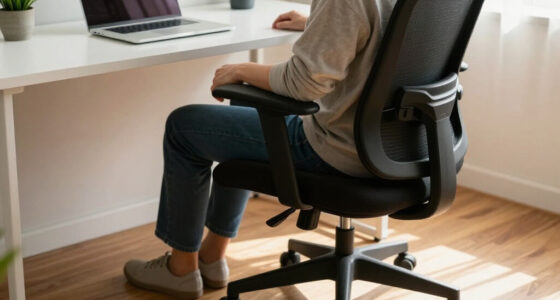
ergonomic office chair with lumbar support
As an affiliate, we earn on qualifying purchases.
As an affiliate, we earn on qualifying purchases.
Why Lumbar Support Is a Game-Changer for Long Sitting
Ever notice how your lower back feels sore after hours at a desk? That’s because your lumbar curve, which naturally inwardly curves in your lower spine, tends to flatten out under prolonged sitting without proper support. When this natural curve diminishes, it causes the spine to adopt a more extended, less supported posture, increasing strain on the ligaments, discs, and muscles. Lumbar support acts like a tailored cushion that maintains this inward curve, keeping your spine aligned and reducing unnecessary stress. This alignment is crucial because misalignment can lead to muscle fatigue, disc compression, and chronic pain. For example, an accountant sitting at a desk all day benefits from a chair with adjustable lumbar support because it prevents slouching, which is a primary contributor to lower back pain. Studies show that consistent lumbar support can reduce back discomfort by 30-45%, but the real benefit lies in preventing the cascade of issues caused by poor posture—long-term musculoskeletal health, decreased fatigue, and improved comfort. Therefore, lumbar support isn’t just a feature; it’s a fundamental element in the design of effective long-sitting chairs, directly influencing your health and productivity.
As an affiliate, we earn on qualifying purchases.
Top 5 Features to Look for in a Long Sitting Chair
| Feature | Why It Matters |
|---|---|
| Adjustable height | Ensures your feet rest flat on the floor, which is vital for maintaining proper blood flow and reducing pressure on your knees and hips. Proper height adjustment allows your thighs to be parallel to the ground, promoting better circulation and reducing fatigue. |
| Lumbar support | Supports the lower back’s natural curve, preventing slouching and reducing the risk of chronic back pain. Without this support, muscles have to work harder to keep your posture, leading to fatigue and discomfort over time. |
| Breathable material | Prevents overheating and excessive sweating, which can cause discomfort and distraction during long hours. Breathable fabrics like mesh facilitate airflow, helping maintain a cool, dry surface and reducing skin irritation. |
| Swivel base | Allows easy movement and access to different areas of your workspace without straining or twisting your spine. This promotes dynamic sitting, which can reduce stiffness and increase circulation. |
| Adjustable armrests | Relieves shoulder tension and supports natural arm positioning, reducing strain on neck and shoulders. Properly positioned armrests also help prevent slouching and promote better posture alignment. |
Choosing a chair with these features ensures that you can customize your sitting experience, which is crucial for maintaining comfort and health during extended periods of sitting. Remember, the right combination of support, adjustability, and materials can significantly reduce the risks associated with prolonged sitting, such as musculoskeletal disorders and circulatory problems.
As an affiliate, we earn on qualifying purchases.
The Latest in Seating Tech: Smarter, Cooler, Better
Modern seats are smarter than ever. Sensors can now monitor your posture and alert you to adjust or take breaks. Imagine a chair that gently vibrates when you slouch or stay seated too long. Some models incorporate cooling gels into cushions, which absorb heat and keep you comfortable even during marathon sitting sessions.
For instance, ergonomic office chairs with dynamic lumbar support automatically adapt as you move, reducing strain and improving comfort over hours. Eco-friendly materials like recycled plastics and natural fibers also mean you can sit well and feel good about it.
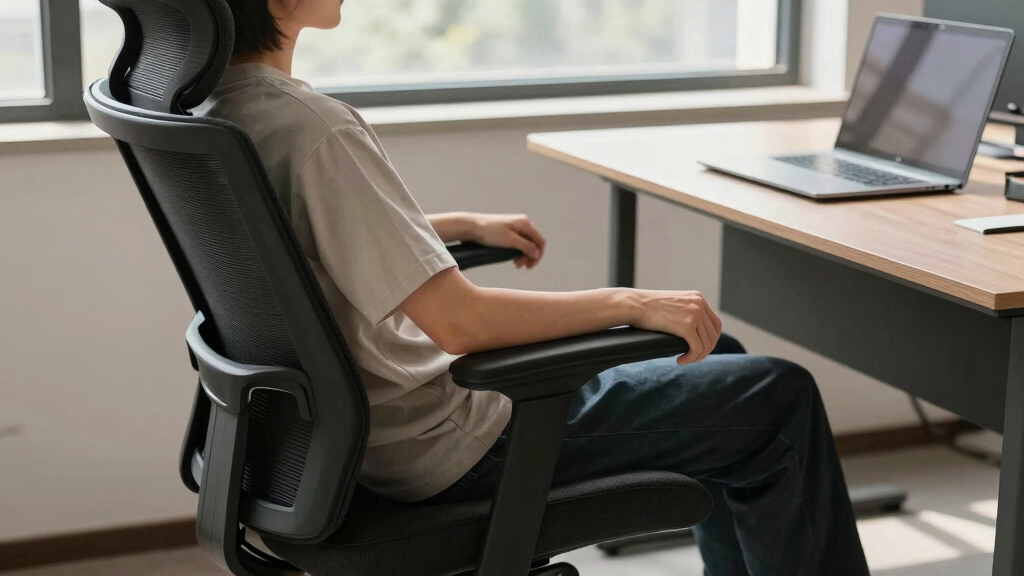
ergonomic chair with adjustable armrests
As an affiliate, we earn on qualifying purchases.
As an affiliate, we earn on qualifying purchases.
How Often Should You Break During Long Sitting? And How to Do It Right
Long sitting is manageable only if you incorporate regular movement. Experts advise taking a break every 30 to 60 minutes. Standing, stretching, or walking around for at least 5 minutes helps prevent stiffness, reduces muscle fatigue, and promotes better circulation. These breaks are essential because they allow your muscles and joints to reset and recover from static positions, which can otherwise lead to discomfort and even long-term health issues. For example, setting a timer or using a smart desk that reminds you to move can be highly effective. Incorporating simple movements like shoulder rolls, leg lifts, or brief walks to the water cooler can significantly improve your comfort and productivity. These acts also help maintain joint flexibility and muscle tone, reducing the risk of repetitive strain injuries and promoting overall well-being during extended sitting periods.
Sitting vs. Standing: Which Is Better for Long-Term Health?
Standing desks have gained popularity, but are they better? The truth is, both sitting and standing have pros and cons. Standing can reduce the risks linked to prolonged sitting, such as cardiovascular issues and poor circulation, but overusing standing can lead to fatigue, leg discomfort, and varicose veins. The key is moderation and variation. Combining sit-stand routines allows you to enjoy the benefits of both postures while minimizing their downsides. For example, alternating 30 minutes sitting with 15 minutes standing encourages movement, reduces static load, and keeps muscles engaged. This variation helps prevent stiffness and promotes circulation. The most effective long-term strategy is to listen to your body and adjust your setup as needed, ensuring you’re not overdoing either posture. Research indicates that a balanced approach—integrating movement, varied postures, and regular breaks—is optimal for maintaining musculoskeletal health and overall well-being over time.
How to Maintain Good Posture During Long Sitting Sessions
Good posture during long sitting is about more than just sitting up straight; it requires awareness of your body’s alignment and subtle adjustments throughout the day. Proper posture reduces strain on muscles, ligaments, and discs, which in turn prevents discomfort and long-term injuries. Keep your feet flat on the floor with your knees bent at approximately 90 degrees to promote healthy blood flow. Your lower back should be supported by the chair’s lumbar support to maintain the spine’s natural inward curve. Shoulders should be relaxed and not hunched, while your monitor should be positioned at eye level to prevent neck strain. Imagine your head balanced directly over your shoulders—this alignment minimizes unnecessary tension. For example, a graphic designer working on detailed projects can use a footrest and adjustable monitor stand to fine-tune their posture, reducing neck and back strain. Remember, small, frequent adjustments—like shifting your sitting position or stretching—are key to sustaining good posture, preventing fatigue, and avoiding discomfort over long periods.
Frequently Asked Questions
What features should I look for in a chair for long sitting?
Focus on ergonomic support like adjustable height, lumbar support, breathable materials, and mobility features such as a swivel base. These elements help maintain comfort and good posture over hours.
Are standing desks better than sitting desks?
Standing desks can reduce the health risks of prolonged sitting but are most effective when used with movement breaks and alternating postures. The key is balance, not just standing or sitting all day.
How often should I take breaks when sitting for long periods?
Experts recommend every 30 to 60 minutes. Stand, stretch, or walk for about 5 minutes to improve circulation and reduce stiffness. Setting reminders can help enforce this habit.
Can ergonomic chairs prevent back pain?
They significantly reduce the risk, especially when combined with proper posture and regular movement. No chair is a cure-all, but support is a key part of prevention.
What are some tips for maintaining good posture during long sitting sessions?
Keep your feet flat, knees at 90 degrees, back supported, and shoulders relaxed. Position your monitor at eye level, and avoid slouching or craning your neck. Small, consistent adjustments help sustain good posture.
Conclusion
Great seating isn’t just about comfort; it’s about health and sustainability. By prioritizing adjustable, supportive chairs and weaving movement into your routine, you turn long sitting from a health risk into a manageable part of your day.
Think of your chair as an ally—one that adapts to you, keeps you supported, and reminds you to move. Your body will thank you, and your day will flow smoother.
Halloween Picks
halloween
As an affiliate, we earn on qualifying purchases.