TL;DR
Listen free for 30 days with Audible
Thousands of audiobooks and originals — cancel anytime.
Start your free trialAs an affiliate, we earn on qualifying purchases.
The best reading lamp for low vision offers adjustable brightness, good glare control, and proper positioning. Bringing light close to the page significantly boosts clarity without causing discomfort.
Imagine trying to read a favorite book, but every word blurs or causes glare. It’s frustrating and exhausting. The right lamp can turn that struggle into a clear, comfortable experience. But choosing the best one isn’t just about wattage or style. It’s about understanding what truly makes a lamp work for your eyes and habits.
In this guide, you’ll learn how to pick a lamp that enhances contrast, reduces glare, and fits your space and needs. Whether you read for leisure, work, or medication labels, the right lighting makes all the difference. Let’s explore how to find a lamp that helps you see more clearly—without eye strain or discomfort.
Adjustable brightness and color temperature are essential for comfort and optimal clarity.
Position your lamp close to your reading material, below eye level, and at an angle to reduce glare and shadows.
Choose diffused, shaded lights to prevent reflections and hot spots that strain your eyes.
Test lighting with your actual reading materials before buying to ensure comfort and effectiveness.
Modern LED lamps with flicker-free operation and high CRI can greatly enhance visual performance without overheating.
A Guide to Reading Lamps for Low Vision
The best lamp is not simply the brightest. It combines adjustable output, controlled glare, flexible positioning, comfortable color temperature, and accessible controls—helping print appear clearer without overwhelming the eyes.
Five features that matter most
Visual comfort depends on the interaction between the lamp, the page, the room, and the reader. Prioritize adjustment and control so the setup can respond to fatigue, print size, surface glare, and changing daylight.
Smooth dimming
Several brightness levels—or continuous dimming—make it easier to find enough light without washing out the page.
Diffused illumination
A shade or diffuser softens hot spots. The bulb should never be directly visible from the normal reading position.
Flexible positioning
An adjustable head and stable arm let the beam move close to the material while remaining below eye level.
Low-flicker LEDs
Flicker can contribute to headaches or eyestrain. Check performance at reduced brightness, where flicker may become more noticeable.
Adjustable kelvins
Warm, neutral, and cool settings allow direct comparison. No single color temperature works best for every eye condition.
Tactile controls
Large buttons, high-contrast markings, setting memory, and a stable base are more dependable than touch-only operation.
Placement turns output into useful illumination
Lumens measure total lamp output; lux describes how much light actually reaches the reading surface. Distance and beam direction can therefore matter more than headline wattage.
Move closer
Bring the lamp toward the page before automatically increasing power. Small distance changes can produce a large practical difference.
Stay below eye level
Keep the source outside the direct line of sight so light reaches the task without shining toward the face.
Oppose the writing hand
Right-handed readers usually place the lamp left; left-handed readers place it right to reduce hand shadows.
Tilt away reflections
Glossy books, tablets, and laminated labels require small angle changes until bright reflections disappear.
Set moderate output
Begin below maximum brightness.
Bring the beam close
Illuminate the whole reading area.
Remove reflections
Tilt the head and material slightly.
Fine-tune brightness
Stop before the page looks washed out.
Color temperature and CRI
Color temperature changes the character of the light; CRI describes how naturally colors appear. Neither measurement tells you whether a lamp is bright enough, glare-free, or correctly positioned.
The useful color-temperature spectrum
Test with your own eyes and materialsWarm / relaxing
Balanced clarity
Crisp / may glare
| Reading need | Brightness control | Suggested color approach | CRI target | Glare priority |
|---|---|---|---|---|
| Leisure reading | ✓Smooth dimming | Warm to neutral | 80+ | Diffused shade |
| Medication labels | ✓Bright, adjustable | Neutral white | 90+ preferred | Even, close beam |
| Crafts and color work | ✓Wide output range | Neutral to daylight | 90+ preferred | Matte surfaces |
| Tablet or glossy page | ~Moderate output | User preference | 80+ | Angle is critical |
| Evening reading | ✓Low-end dimming | Warm to neutral | 80+ | Add room light |
CRI supports color recognition; it does not measure contrast, glare, flicker, or usable lux at the page.
The five-minute real-world check
A specification sheet cannot predict personal glare sensitivity. Test the lamp with actual books, labels, screens, and crafts—and use a retailer with a practical return policy.
What to verify
Why Brightness and Dimming Matter More Than You Think
Bright enough, but not too bright—that’s the sweet spot for low vision. A lamp with adjustable brightness, measured in lumens, allows you to tailor the light to your task. For example, a soft 300 lumens might be perfect for evening reading, while 800 lumens can help with detailed crafts during the day.
Adjustability helps prevent eye fatigue. A lamp that dims smoothly lets you find that just-right glow—no harsh spots or washed-out pages. Remember: more light isn’t always better. Overly bright lighting can cause glare, making reading even harder.
Try this: place your lamp close to your reading material. Increasing brightness at a short distance boosts contrast and clarity. It’s like adding a spotlight right where you need it, without shining into your eyes.
Understanding why brightness and proximity matter is crucial because they directly influence how well your eyes can distinguish details. Too much light can cause glare, leading to discomfort and even temporary visual impairment, while too little reduces contrast, making words fuzzy. The goal is to find a balance where the light enhances the contrast of the print without overwhelming your eyes, enabling sustained reading with less fatigue.
adjustable LED reading lamp for low vision
As an affiliate, we earn on qualifying purchases.
As an affiliate, we earn on qualifying purchases.
How to Control Glare and Keep Your Eyes Comfortable
Glare is a sneaky foe—it can wash out details, create uncomfortable reflections, and lead to headaches. For low vision users, glare reduces the contrast between text and background, making reading more difficult and tiring the eyes faster. A good lamp should have a diffused or shaded light source, so the beam softens before reaching your page, which minimizes harsh reflections and hot spots. Avoid exposed bulbs or shiny, reflective surfaces that bounce harsh light around, as these can increase discomfort and reduce clarity.
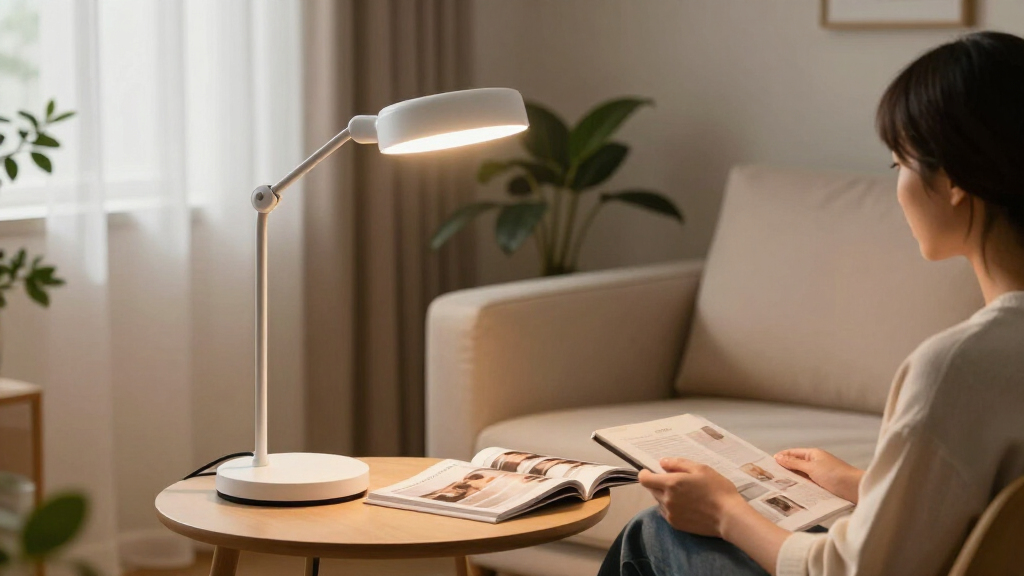
Positioning your lamp correctly is equally important. Place it so the light shines from the side, slightly below the page, and at an angle that minimizes reflections. For example, if you’re right-handed, position the lamp on your left. Adjust the angle until reflections from glossy pages or screens are minimized—sometimes a small tilt can make a big difference. Think of it like adjusting a camera lens to avoid glare and get a clear shot—small tweaks can dramatically improve visual comfort and clarity.
Controlling glare isn’t just about comfort; it’s essential for preserving your visual clarity. Excessive glare causes your pupils to constrict and dilate repeatedly, which leads to eye strain and fatigue. It also reduces the contrast between the text and the background, making reading more difficult and tiring your eyes faster. Practical glare-reduction techniques—like using diffusers, positioning the light at an optimal angle, or employing matte finishes—help create a softer, more even illumination. This not only extends your reading endurance but also prevents the discomfort that can arise from prolonged exposure to harsh light, especially for those with contrast sensitivity issues or eye conditions that exacerbate glare sensitivity.
As an affiliate, we earn on qualifying purchases.
Perfect Placement: Position Your Light for Maximum Clarity
Placement is everything. For optimal reading, position your lamp close to your page, below eye level, and angled to illuminate the entire surface evenly. This reduces shadows and bright spots that can confuse your eyes and cause strain. Proper placement ensures consistent contrast across the page, making it easier to distinguish words and details.
Imagine a small desk lamp with a flexible arm. Moving it just a few inches closer can significantly increase the amount of light on your page, enhancing clarity. Keep it off to the side opposite your dominant hand—this way, your hand won’t cast shadows as you write or turn pages. Experiment with angles—sometimes, moving the light just an inch or tilting it slightly can eliminate dark corners or reflections. Adjusting your lamp’s position helps your eyes perceive contrast more uniformly, reducing fatigue and improving overall visual comfort.
Proper placement isn’t just about brightness; it’s about ensuring your eyes receive evenly distributed light that accentuates contrast and fine details. Positioning the lamp too far away or at an incorrect angle can create uneven lighting, leading to shadows or glare that strain your eyes. Conversely, a well-placed light close to the page, angled to avoid reflections, ensures uniform illumination. This not only reduces eye strain but also enhances your ability to see subtle details—crucial for tasks requiring precision or prolonged reading sessions.
flicker-free reading light with high CRI
As an affiliate, we earn on qualifying purchases.
As an affiliate, we earn on qualifying purchases.
Color Temperature and CRI — What They Mean for Your Eyes
Color temperature measures whether a light feels warm or cool. For low vision, neutral white (around 3500–4500 K) often offers the best balance—bright enough without feeling harsh. Warm white (2700–3000 K) feels cozy and relaxing but might lack contrast, while daylight (5000–6500 K) can boost perceived clarity but may cause glare. The choice impacts how your brain perceives contrast and detail—warmer tones can sometimes make details appear softer, while cooler tones tend to enhance sharpness and clarity. Selecting the right temperature isn’t just about preference; it influences your visual processing and comfort during extended reading sessions.
Look for lamps with adjustable color temperature. This flexibility allows you to experiment and find the setting that best suits your environment and tasks. For example, a warmer tone might be preferable in the evening to reduce eye strain, while a cooler, daylight setting can be better for detailed tasks during the day. Testing different settings helps you find what feels most natural and enhances your ability to distinguish fine details.
CRI indicates how accurately a light renders colors naturally. A high CRI (80 or above) ensures subtle shades and contrasts are visible, which can be crucial for tasks like reading medication labels or distinguishing between similar colors in crafts. For black-and-white reading, brightness and contrast are more critical, but good CRI still supports overall visual comfort. Choosing a lamp with appropriate color temperature and high CRI can significantly reduce eye fatigue and improve your ability to perceive details, making your reading experience more comfortable and effective.
dimmable bedside lamp for low vision
As an affiliate, we earn on qualifying purchases.
As an affiliate, we earn on qualifying purchases.
Flicker-Free Lighting: Why It Matters for Your Eyes
Flicker-free lamps produce steady, uniform light, avoiding the subtle flickering that some LEDs exhibit. Even if you don’t notice flicker consciously, it can cause eyestrain, headaches, or discomfort over time, especially during prolonged reading sessions. Flickering can also lead to visual fatigue because your eyes are constantly adjusting to perceived changes in brightness, which can be particularly taxing for individuals with sensitive eyes or neurological conditions. Choosing flicker-free lighting helps maintain a stable visual environment, reducing strain and allowing your eyes to relax while focusing on the task at hand.
Look for lamps labeled as flicker-free or low-flicker, and consider testing them in-store or reading reviews from other low vision users. Modern LED technology often includes flicker mitigation features, but not all models do. Prioritizing this feature can prevent subtle but persistent discomfort, enabling longer, more comfortable reading sessions. Think of flicker as a flickering candle in a dark room—it’s distracting and tiring. Steady, smooth light creates a calming environment that supports sustained focus and reduces the risk of headaches or visual fatigue caused by inconsistent illumination.
Flicker isn’t just an annoyance; it can significantly impact your visual endurance and comfort. Continuous flickering can cause your eye muscles to tense repeatedly, leading to fatigue and discomfort. For those with sensitive eyes or neurological conditions, flicker can even trigger migraines or headaches. Selecting flicker-free lighting ensures your eyes are not subjected to unnecessary strain, helping you maintain focus longer and reducing discomfort over time. This small but crucial feature can make a substantial difference in your overall reading experience.
Controls That Make Your Life Easier
Easy-to-use controls are vital. Large, tactile buttons or switches with high contrast help you find and operate the lamp without frustration. For example, a lamp with a big, textured dial or a bright button is much easier to locate in low light or with limited vision. Additionally, controls that respond reliably and don’t require excessive force reduce the risk of accidental adjustments, which can be frustrating or disruptive. Consider lamps that include features like memory settings, remote controls, touch panels, or voice commands—these options can significantly improve accessibility and independence, especially if reaching or seeing controls is challenging.
Testing the controls before purchasing, if possible, allows you to assess their tactile feel and ease of operation. A stable base, smooth arm movement, and consistent operation contribute to a positive user experience. The goal is to select a lamp that can be operated confidently and effortlessly, ensuring you maintain control over your lighting without unnecessary hassle. An accessible, intuitive control system reduces frustration, supports independence, and helps you maintain a routine of effective lighting management, which is crucial for ongoing comfort and safety during reading or other tasks.
Different Types of Lamps for Every Reading Situation
Choosing the right lamp depends on your space and habits. Adjustable desk lamps are ideal for reading on a table or desk—flexible arms let you direct light precisely where needed, which is crucial for tasks requiring high contrast and detail. Floor lamps are suitable beside armchairs or beds, often providing broader illumination and stability. Clamp lamps are space-saving options that attach directly to surfaces, making them perfect for limited spaces or portable setups. Rechargeable lamps offer portability, allowing you to move your light easily between rooms or outdoor settings, which is especially helpful if you frequently change locations or have limited access to outlets. Some models combine lighting with magnifiers, providing both illumination and visual enhancement for detailed tasks like reading small print or sewing.
Matching your choice to your environment requires understanding your specific needs. For example, a flexible desk lamp provides precise control for reading small print, but a standing, adjustable floor lamp offers a wider reach for larger areas. Consider your routine and space constraints to select a type that ensures consistent, comfortable lighting. The right choice enhances your ability to perform low-vision tasks efficiently and comfortably, reducing eye strain and increasing independence across different activities and settings.
Latest Innovations Making Your Reading Easier
Modern reading lamps incorporate technological advances that significantly improve usability and visual comfort. LED technology now offers brighter, cooler, and more energy-efficient light with less heat output, reducing discomfort during extended use. Tunable-white LEDs enable you to adjust the color temperature, allowing you to switch from warm to daylight tones depending on your activity or time of day—this flexibility helps optimize contrast and reduce eye fatigue. Larger diffusers and advanced glare control features create even, soft illumination, eliminating hot spots and reflections that can strain your eyes. Some lamps include integrated features like USB charging ports, automatic shutoff, and smart controls—these streamline your setup and make adjustments effortless. Many models now combine light, magnification, and adjustable stands into one device, reducing clutter and enhancing functionality. These innovations aim to boost clarity, minimize eye strain, and promote independence, making your reading experience more comfortable and efficient. Technological integration, such as app controls or voice activation, further enhances ease of use, especially for users with dexterity challenges or visual impairments.
Your Checklist for a Smart Purchase
Before buying, ask yourself if the lamp:
- Has adjustable brightness and color temperature?
- Features an adjustable arm and diffused, shielded light?
- Provides even page illumination without glare?
- Offers easy-to-operate, high-contrast controls?
- Fits your space and reading habits?
- Has reliable warranty and replaceable parts?
Test it with your actual books or labels whenever possible. Small adjustments could make a huge difference in your comfort and clarity. Remember, investing in the right lighting isn’t just about convenience; it’s about supporting your independence and reducing strain over the long term. Prioritize features that enhance ease of use, adaptability, and durability to ensure your setup remains effective and comfortable for years to come.
Your Questions Answered — Real Concerns About Low-Vision Lighting
How bright should a reading lamp be? Brightness depends on your needs, but a dimmable lamp from 300 to 800 lumens offers flexibility. Adjustability is key—find what feels comfortable without glare.
Warm or daylight light — which is better? Neither is universally better. Comfort varies. Adjustable color temperature helps you find your ideal setting.
Are LEDs suitable for low vision? Yes. They provide high output, low heat, and customizable settings. Quality varies, so choose models with good flicker control and high CRI.
Where should I position my lamp? Close to the page, below eye level, angled to prevent reflections and shadows. Small changes in placement make a big difference.
Can a lamp be too bright? Yes. Overly intense light can cause discomfort and reduce clarity. Adjust brightness to what feels easiest on your eyes.
Should the rest of the room be dark? Usually, a gentle ambient light reduces harsh contrasts. Avoid direct glare from windows or overhead lights that blind your eyes.
What does ‘full-spectrum’ mean? It’s often used loosely. More important are brightness, spectral distribution, and proper positioning for better vision and comfort.
Is a high-CRI lamp necessary? For color-sensitive tasks, yes. For black-and-white reading, it’s less critical than brightness and glare control.
Do blue-light filters help? They can make evening reading more comfortable but won’t fix low vision problems. Focus on proper lighting and contrast first.
Will brighter light stop vision loss? No. Lighting helps use your remaining vision but doesn’t treat eye diseases. Consult a professional for medical concerns.
Magnifying lamps better than regular? Useful for detail work, but not ideal for long reading sessions. Separate lamps with magnification options often work best.
Are touch controls accessible? They can be challenging. Look for tactile, large, or high-contrast controls, or consider voice commands if available.
Conclusion
The right lamp doesn’t just light your page — it transforms your entire reading experience. Focus on adjustability, placement, and glare control to find the perfect match for your eyes. Good lighting isn’t a luxury; it’s a simple step toward more independence and comfort every day.
Imagine a calm, well-lit corner where words come alive, not fade into shadows. That’s what the right reading lamp can give you—a clearer view of the world, one page at a time.
Baby shower & registry season Picks
baby registry must-haves
As an affiliate, we earn on qualifying purchases.