
TL;DR
Selecting an ergonomic chair isn’t about the latest trend or price tag. Focus on proper fit, adjustability, and how the chair complements your workspace. Good support encourages comfort and reduces strain over long hours.
Imagine spending hours at your desk, feeling stiff, sore, or just plain uncomfortable. That’s often the result of choosing a chair based on looks or a quick online review. But a truly supportive, ergonomic chair is about more than just aesthetics—it’s about fit, adjustments, and understanding your body’s needs.
In this guide, you’ll learn the concrete features that matter most, how to evaluate a chair before buying, and practical tips to set yourself up for all-day comfort. Whether you work from home or in an office, mastering these details can make a real difference in your daily comfort and long-term health.
Prioritize adjustability—seat height, lumbar support, armrests—for a personalized fit.
Test chairs in person for at least 15 minutes to feel how they support movement and comfort.
A well-fitting chair won’t fix poor work habits—monitor setup and take regular breaks.
Comfort depends on proper pressure distribution, not just soft cushions or fancy features.
Choose a chair that matches your body size and workspace to prevent strain and discomfort.
Choosing an Ergonomic Office Chair for Support
A supportive chair is not defined by its price, brand, or silhouette. The best choice fits your body, adapts to your desk, distributes pressure evenly, and makes frequent movement feel natural.
Seat height, seat depth, lumbar position, armrest range, and recline behavior matter more than styling or an impressive feature count.
A common range, not a universal prescription.
Leave a small gap behind the knees.
Long enough for pressure points to emerge.
The standard configuration for chair stability.
The controls that shape a supportive fit
Useful adjustments let the chair meet your body where it is. More controls only help when their ranges are suitable and you understand how to use them.
Seat height
Set feet flat on the floor or a footrest. Knees should be roughly level with, or slightly below, the hips without pressure behind the thighs.
Seat depth
Sit fully against the backrest and check for a two-to-four-finger gap behind the knees. A sliding seat pan supports different leg lengths.
Lumbar support
Support the lower back’s natural inward curve without a hard pressure point. Adjustable height and depth provide the most useful control.
Backrest and tilt
Choose a backrest that supports the lower and mid-back while allowing smooth recline. Tension should match your weight and movement.
Armrests
Forearms should rest without raised shoulders. Lower, widen, or remove armrests if they prevent the chair from approaching the desk.
Seat surface
Look for even support, a rounded front edge, breathable materials, and cushioning that stays supportive instead of collapsing beneath you.
Fit the whole system, not the chair alone
Your chair, desk, and equipment must agree.
A well-designed chair cannot compensate for a high desk, a distant keyboard, or a low monitor. Set the chair for your body first, then adapt the workstation around that position.
- Hips rest slightly above the knees.
- Feet stay fully supported.
- Elbows remain close to the body.
- Keyboard and mouse are easy to reach.
- Monitor supports a neutral head position.
Dimensions and adjustment ranges must suit your body.
The chair must approach the desk without awkward reaching.
Visual appeal matters only after fit and function are confirmed.
Softness is not the same as comfort
Long-term comfort depends on pressure distribution, temperature, edge design, and sustained support. Judge the complete seat rather than the material name alone.
| Seat type | Pressure support | Breathability | Long-session risk | What to verify |
|---|---|---|---|---|
| Supportive foam | ✓ Strong | ~ Varies | Heat retention or gradual compression | Density, resilience, and rounded front edge |
| Mesh seat | ~ Varies | ✓ High | Frame contact and concentrated pressure | Edge padding, tension, and frame clearance |
| Very soft cushion | ✗ Weak | ~ Varies | Sinking, slouching, and unstable posture | Whether support remains after 20 minutes |
| Firm contoured seat | ✓ Strong | ~ Varies | Contours may not match every body | Even contact without pinching or pressure points |
Personal comfort cannot be confirmed from specifications alone.
A five-step path to neutral, movable support
Plant your feet
Use the floor or a stable footrest as your base.
Set seat depth
Keep the back supported and the knee area clear.
Shape the backrest
Align lumbar support without creating a hard pressure point.
Relax the arms
Support forearms while keeping shoulders down.
Enable movement
Adjust recline tension and avoid locking one posture all day.
Test the chair under real working conditions
Sit fully back
Your hips should reach the backrest without the seat edge pressing behind your knees.
Adjust every control
Confirm each range is large enough and the controls are reachable while seated.
Recline and return
The mechanism should move smoothly and support you without excessive effort.
Approach the desk
Armrests and chair height must allow a close, relaxed keyboard position.
Scan for pressure
Notice pinching, numbness, concentrated weight, heat, or unsupported areas.
Move naturally
Rotate, roll, shift, and recline without twisting or fighting the chair.
Common choices that sabotage comfort
Buying for looks
A stylish chair with narrow adjustment ranges may never fit your proportions or working position.
Choosing an oversized seat
Excess depth can prevent backrest contact and encourage sliding forward or slouching.
Raising the chair for the desk
If feet lose support, use a footrest or adjust the desk instead of leaving the legs hanging.
Overdoing lumbar pressure
Support should follow the natural curve, not force the lower back into an exaggerated position.
Locking the backrest
Holding one upright position for hours increases static muscle load and discourages movement.
Expecting a chair to solve everything
Monitor height, input-device reach, task variety, and regular breaks remain equally important.
The best posture is usually the next comfortable posture
A chair can improve comfort and positioning, but it cannot remove every risk of prolonged sitting. Persistent pain, numbness, weakness, or tingling should be assessed by a qualified healthcare professional.
How to Pick a Chair That Fits Your Body and Workspace
The key to comfort isn’t just finding a stylish chair. It’s matching its size and features to your body and your desk setup. A good fit means your feet rest flat, your back is supported, and your arms can reach your keyboard without strain.
Start with your height and leg length. Look for a chair with a seat height range of roughly 40–53 cm. If you’re taller or shorter than average, check if the chair can accommodate your size comfortably. For example, a taller person needs more seat depth and height adjustability to prevent pressure behind the knees and keep feet supported.
Next, consider your workspace. Is your desk at a standard height of about 72-75 cm, or do you have a sit-stand desk? Your chair should allow you to sit with your hips slightly above your knees, creating a gentle angle that encourages good posture. If your desk is higher, a footrest can help keep your legs supported and prevent slouching.
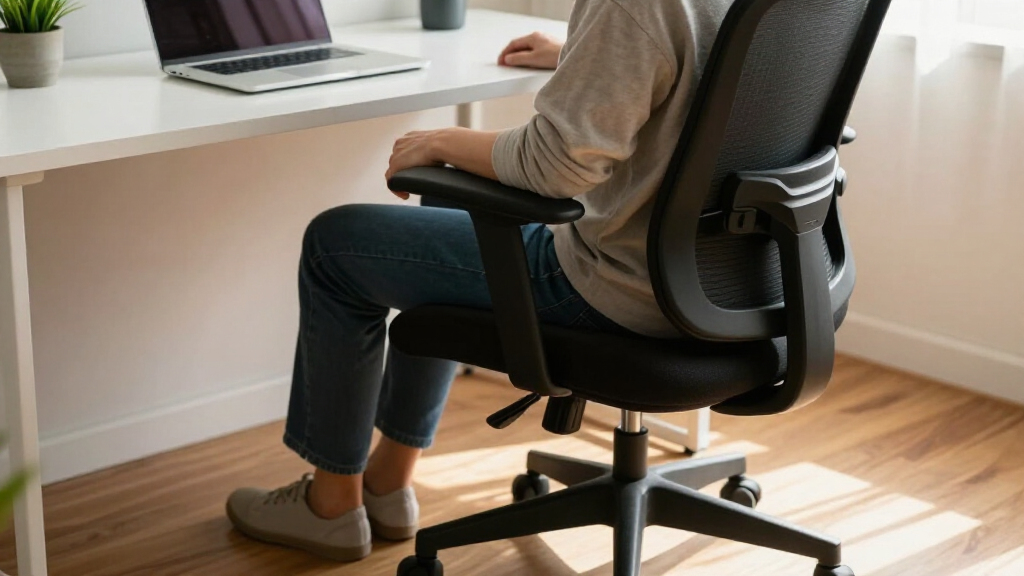
ergonomic office chair with adjustable lumbar support
As an affiliate, we earn on qualifying purchases.
As an affiliate, we earn on qualifying purchases.
The Adjustable Features That Make Your Chair Support Your Back
Adjustability is king. The more you can fine-tune your chair, the better it will support your unique body. Focus on these key features:
- Seat height: Should allow feet to rest flat, with knees roughly at a 90-degree angle. Proper height prevents pressure behind the knees and promotes healthy circulation.
- Seat depth: Needs a 2-4 finger gap between the seat edge and the back of your knees. Correct depth prevents pressure points and ensures your back receives proper lumbar support.
- Lumbar support: Supports your lower back’s natural inward curve. Adjustable height and depth are best because they allow you to customize support to your specific lumbar shape, reducing strain and fatigue over long periods.
- Backrest tilt: Should recline comfortably, with tension that matches your weight, encouraging subtle movement. This flexibility reduces static muscle tension and promotes circulation.
- Armrests: Adjustable height and width support your forearms without shrugging shoulders or forcing you to lean forward. Proper arm support reduces shoulder and neck tension, especially during prolonged typing or mouse use.
For example, a user with a shorter torso found that a chair with a height-adjustable lumbar and a sliding seat pan reduced back pain after just a week of proper setup. Fine-tuning these features directly impacts your comfort and posture by allowing the chair to adapt to your body’s needs, preventing discomfort and long-term musculoskeletal issues.
ergonomic desk chair for long hours
As an affiliate, we earn on qualifying purchases.
As an affiliate, we earn on qualifying purchases.
Why Seat Comfort Isn’t Just About Soft Cushions
Think soft, plush padding is always better? Not quite. Comfort depends on how well the seat distributes pressure and supports your weight. A seat that’s too soft may sag and cause you to slouch, leading to poor posture and back pain over time. Conversely, a firmer, well-designed cushion maintains support and encourages proper spinal alignment, reducing fatigue.
Look for a seat with a rounded front edge to reduce pressure behind the knees, which can impede circulation and cause discomfort. Breathable, durable fabric or foam that won’t trap heat is also important, as it prevents sweating and skin irritation during long sitting sessions. For example, a mesh seat might feel cooler, but if the frame isn’t padded properly, it could create pressure points that cause discomfort. High-density foam offers solid support, but if it’s poorly ventilated, it can heat up and become uncomfortable over hours.
Remember, comfort is personal. Spend at least 15-30 minutes sitting in different chairs, paying close attention to areas that feel pinched, compressed, or unsupported. Understanding how your body responds to different materials and shapes helps you choose a seat that will remain supportive and comfortable during extended use.
height adjustable ergonomic office chair
As an affiliate, we earn on qualifying purchases.
As an affiliate, we earn on qualifying purchases.
How to Test a Chair Before You Commit
- Sit fully back: Your hips should touch the backrest without forcing you forward. This ensures proper lumbar support and prevents slouching.
- Check foot support: Feet should rest flat on the floor or a footrest, maintaining circulation and reducing leg fatigue.
- Adjust lumbar support: It should follow your lower back’s natural curve comfortably, preventing slouching and reducing strain.
- Test armrests: Should support your forearms at a relaxed height without shrugging or raising shoulders, reducing neck and shoulder tension.
- Recline and move: The chair should tilt smoothly and support dynamic sitting, which helps reduce static muscle tension and promotes circulation.
- Fit beneath your desk: Ensure the chair can slide close enough without hitting the desk or forcing awkward angles, allowing for proper keyboard and mouse positioning.
- Spend time: Sit for at least 15 minutes to see how the chair supports your posture and comfort over time, as initial impressions might be misleading.
- Review adjustments: Confirm the ranges are sufficient for your body size and workspace needs, ensuring you can customize the chair to your optimal sitting position.
For example, a person who initially liked a chair in the store realized after a 20-minute test that it pinched behind the knees and was too high for their desk setup. Taking the time to test in real sitting conditions helps identify issues that aren’t obvious in a quick glance, ensuring a better long-term fit and support.
office chair with customizable armrests
As an affiliate, we earn on qualifying purchases.
As an affiliate, we earn on qualifying purchases.
Common Mistakes That Sabotage Your Comfort
Many people pick a chair based on looks or price, ignoring how it actually fits their body. For example, buying a larger seat because it feels spacious initially can cause poor posture if it doesn’t support your back or legs properly. Oversized seats can cause you to slide forward or slouch, leading to back pain and discomfort over time.
Other mistakes include setting the chair too high to reach a high desk, which can cause strain on your legs and lower back, or using lumbar support that’s too aggressive, which can push your lower back into an unnatural position, causing pain. Locking the backrest upright all day prevents natural movement, leading to stiffness and muscle fatigue. Soft cushions may seem inviting but can cause you to sink in, reducing your ability to maintain proper spinal alignment.
Remember, a chair can’t fix poor work habits. Always check that your monitor, keyboard, and mouse are positioned correctly, and take regular breaks to move around. Good ergonomics involves both the right equipment and healthy habits.
Your Top Questions About Finding the Right Office Chair
What makes an office chair truly ergonomic? It’s about how well the chair’s adjustments support your body’s natural positions and how easily you can change postures during the day. An ergonomic chair allows you to sit comfortably with minimal strain, while also enabling easy adjustments to shift positions, which helps prevent stiffness and musculoskeletal issues.
Is lumbar support necessary? For many, a gentle curve support helps prevent slouching, but it should match your lower back’s shape. Too aggressive a support can cause discomfort or pressure points, so the key is a support that adapts to your anatomy. Proper lumbar support reduces strain on the lower back muscles and discs, helping you maintain good posture for longer periods.
How high should the chair be? Feet flat on the floor or footrest, thighs parallel to the ground, and hips slightly above knees. This positioning ensures good circulation and minimizes pressure points. If your desk height doesn’t allow this naturally, an adjustable chair combined with a footrest can help achieve the optimal posture.
Does reclining help? Yes. Reclining redistributes pressure across your back and encourages movement, which reduces fatigue and stiffness. A slight recline (about 100-110 degrees) can also relieve pressure on your lumbar spine, promoting comfort during long periods of sitting.
Are all ergonomic chairs suitable for everyone? Not necessarily. Taller, shorter, or larger-framed users need chairs with wider or taller adjustment ranges. Trying different models and testing for your body size is crucial to find a chair that supports your specific needs effectively.
Frequently Asked Questions
How often should I adjust my chair for optimal support?
Adjust your chair whenever you change tasks or feel discomfort. Regular small tweaks help maintain support and promote movement, reducing fatigue over the day.Can I use a non-ergonomic chair if I take frequent breaks?
While breaks are important, a poorly supportive chair can still cause strain. An ergonomic chair minimizes risks, especially during long periods of sitting, but movement remains essential.Are expensive chairs worth the investment?
Higher-priced chairs often offer broader adjustment ranges, better durability, and longer warranties. Ultimately, the best chair is one that fits your body and supports your work style, regardless of price.What if I have specific back issues?
Consult a healthcare professional for personalized advice. An ergonomic chair with adjustable lumbar support and good fit can help, but it’s only part of a broader approach to back health.Conclusion
Choosing a truly supportive ergonomic chair is about understanding your body and workspace, not just picking the most expensive option. Focus on adjustability, fit, and how the chair supports your movements.
Investing in the right chair isn’t just about comfort—it’s about protecting your long-term health and productivity. Remember, your best posture is often the next one you find comfortable.