TL;DR
Choosing a video magnifier depends on your vision needs, lifestyle, and budget. Modern devices offer AI-enhanced clarity, portability, and features like OCR—making reading easier and more accessible.
Choose a magnification range that matches your severity of vision loss and daily tasks.
Prioritize ease of use with simple controls, especially if you’re new to assistive tech.
Consider portability if you need reading assistance on the go, or a fixed model for home use.
Look for devices with adjustable contrast and high-resolution cameras for clearer images.
Stay informed about new AI and connectivity features that make reading easier and more integrated.
Find the magnifier that fits your eyes, habits, and day.
Choosing a video magnifier depends on your vision needs, lifestyle, and budget. The best device is not simply the most powerful one; it is the tool that makes books, labels, forms, and menus clearer with less strain.
AI-enhanced clarity, adjustable contrast, and OCR are turning magnifiers into smarter reading companions.
Start with the reading task.
Magnification power is the anchor, but comfort comes from the balance of zoom, sharpness, contrast, field of view, and controls that feel natural after the first week.
Match the severity of vision loss.
Moderate low vision may need 2x to 10x. Severe impairment may call for 20x to 60x or more, provided the image remains sharp.
Protect clarity at higher zoom.
High-resolution cameras and smooth focus matter because excessive zoom can pixelate text or narrow the visible reading area.
Tune the view to your eyes.
Black-on-white, white-on-black, color filters, and presets can reduce visual clutter and make long reading sessions easier.
Magnification Spectrum
Choose enough zoom for the smallest print you read often, then check that tracking lines of text still feels comfortable.
Feature Weight
For reading, the most valuable features are the ones that reduce friction every day.

Eyoyo Digital Magnifier Portable Electronic Video Magnifier Reading Aids 3.5 Inch LCD Screen for Low Vision 2x-25x Zoom Foldable Handle
2X-25X Magnification: 3.5-inch digital magnifier supports 2x, 8x, 16x, and 25x magnification; designed for short-term reading assistance, helping…
As an affiliate, we earn on qualifying purchases.
As an affiliate, we earn on qualifying purchases.
Pick the form that fits your routine.
Desktop, portable, handheld, and wearable magnifiers solve different problems. The right choice is the one you will actually reach for when reading becomes difficult.
Desk reading
Fixed models support longer sessions, larger screens, and stable positioning for books, bills, and forms.
Errands
Portable devices help with menus, price tags, receipts, labels, and quick checks outside the home.
Hands-free tasks
Wearables can help with cooking, shopping, or sorting items, though they often cost more and take practice.
Smart reading
OCR and text-to-speech can convert printed material into spoken output when visual reading is tiring.
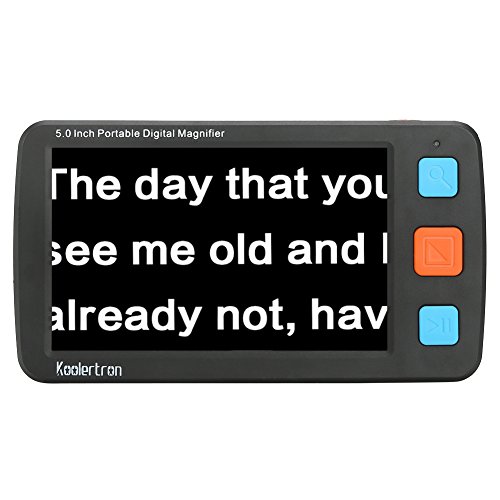
Koolertron Digital Video Magnifier,Handheld Portable Electronic Reading Aid Support AV Output to TV with 4X/8X/16X/32X Zoom Multiple 17 Kinds Color Mode, etc (5 inch, Black)
5inch big screen, 4X/8X/16X/24X/32X switchable magnification
As an affiliate, we earn on qualifying purchases.
As an affiliate, we earn on qualifying purchases.
Compare before you buy.
A strong device combines practical magnification with the screen, battery, controls, and accessibility features your daily life requires.
| Device Type | Best For | Strength | Watch For | OCR / Speech |
|---|---|---|---|---|
| Desktop fixed | Books, mail, forms, long reading sessions | ✓ Large screen and stable image | Less portable and higher price | ~ Often available on advanced models |
| Portable handheld | Menus, shopping, labels, travel | ✓ Lightweight and quick to use | Smaller screen and battery limits | ~ Varies by model |
| Camera-based system | Flexible viewing on monitors or tablets | ✓ Can connect to larger displays | Setup and compatibility checks | ✓ Common in smart systems |
| Wearable magnifier | Hands-free reading and daily tasks | ✓ Mobility and independence | Learning curve and cost | ~ Improving quickly |
| Basic budget model | Occasional reading and simple labels | ~ Lower upfront cost | May lack advanced contrast or OCR | ✗ Not usually included |
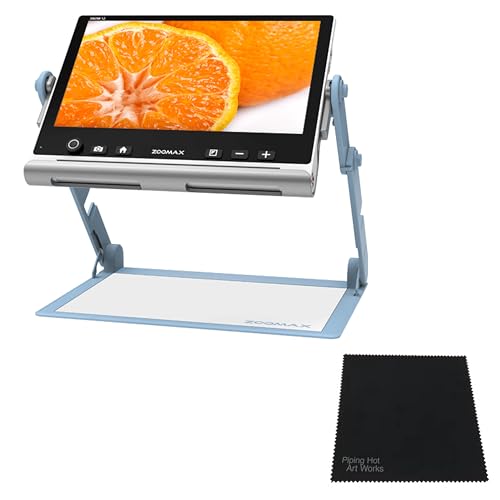
Piping Hot Art Works Zoomax SNOW 12 Inch Foldable Portable Video Magnifier Featuring OCR (Optical Character Recognition) Bundled with Microfiber Cleaning Cloth
VERSATILE FOLDING STAND: Enjoy stability and flexibility with the foldable stand of the Zoomax SNOW 12, perfect for…
As an affiliate, we earn on qualifying purchases.
As an affiliate, we earn on qualifying purchases.
Newer features are useful when they remove strain.
Recent devices are not just brighter screens. They increasingly combine AI image enhancement, mobile connectivity, OCR, speech output, and customized presets.
Automatic clarity boosts.
Image processing can improve contrast and edge definition without requiring constant manual adjustment.
Printed text can become audio.
This matters for longer documents, medication instructions, or days when visual reading is more fatiguing.
Phones, tablets, and monitors can join in.
Some systems sync with mobile devices or external displays, giving you more control over screen size and workflow.
Setup is part of the benefit.
Low vision specialists, tutorials, and calibration help make the device reliable instead of intimidating.

Eschenbach Vario Digital FHD Desktop Video Magnifier – Portable for Low Vision | Includes Liberty Microfiber Cloth
FOLDABLE DESKTOP VIDEO MAGNIFIER – The Eschenbach Vario Digital FHD Video Magnifier is a foldable desktop video magnifier…
As an affiliate, we earn on qualifying purchases.
As an affiliate, we earn on qualifying purchases.
Decision checklist.
Use this sequence to move from feature overload to a practical shortlist that reflects your reading habits, comfort level, and budget.
Bring real materials.
Try pill labels, mail, forms, books, menus, and any print size that currently causes frustration.
Read for more than a minute.
Short demos can flatter a device. Longer testing reveals fatigue, field-of-view issues, and control problems.
Ask about warranty and funding.
Government programs, insurance plans, nonprofits, and clinics may help with purchase or training costs.
Common questions.
The fastest answers usually come from matching the device to the person, not chasing the longest feature list.
What is best for severe low vision?
Look for 20x to 60x magnification, a high-resolution camera, strong contrast modes, and simple controls. A low vision specialist can help tailor the choice.
Can portable models replace fixed models?
Portable devices are excellent for mobility and quick tasks, while fixed models usually offer larger screens, stronger ergonomics, and more advanced features.
Are newer models worth it?
Often, yes. AI-enhanced clarity, better contrast options, rechargeable designs, connectivity, and OCR can meaningfully improve reading comfort.
Do all devices read aloud?
No. Many modern devices include OCR and speech, but not all. Verify text-to-speech before purchasing if audio reading is a priority.
What’s the Most Important Factor? Magnification Power That Fits Your Needs
When choosing a video magnifier, magnification power is king. It’s the core feature that determines how large your text or objects appear. For someone with moderate low vision, 2x to 10x might be enough. For severe impairment, look for models offering 20x to 60x or more.
Imagine reading a small print on a medicine bottle. If your current device only magnifies 5x, you might struggle. But a device with a 40x zoom can make tiny text legible again, almost like reading print on a billboard.
However, higher magnification isn’t always better if it compromises image quality or ease of use. Excessive zoom can lead to pixelation or a narrow field of view, making it harder to locate the text. The tradeoff is between magnification and clarity—finding a device that provides enough zoom without sacrificing image sharpness is crucial. Additionally, adjustable magnification allows you to tailor the view to different tasks, from reading small print to viewing larger objects, offering flexibility that adapts to your changing needs.
Display Types That Match Your Lifestyle: Fixed, Portable, or Wearable
Video magnifiers come in three main styles: fixed desktop models, portable handheld devices, and wearable systems. Each serves different lifestyles and needs.
For example, a librarian who needs to read comfortably at a desk might prefer a large, fixed monitor with high resolution. Meanwhile, someone who shops or reads menus on the go benefits from a lightweight, portable device that fits into a pocket or bag.
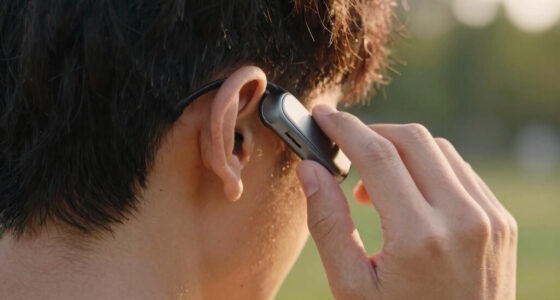
Wearable magnifiers, like glasses with built-in cameras, are emerging. They offer hands-free reading, perfect for tasks like cooking or shopping. But they tend to be more expensive and require adaptation. The choice among these options hinges on your daily routines: fixed models provide stability and larger displays for detailed work, but sacrifice portability. Portable devices enhance mobility but might have limitations in screen size or battery life. Wearables offer the ultimate hands-free convenience but often come with a learning curve and higher costs. Matching the device type to your lifestyle ensures that you use the technology consistently and effectively, making your daily activities less frustrating and more independent.
How to Read Clearer? Image Quality and Contrast Settings Matter
High-resolution cameras paired with adjustable contrast and color filters make a huge difference. Think of it like tuning a radio — the clearer and more customized the settings, the better the sound. For low vision users, sharp images with vibrant contrast cut through visual clutter.
However, understanding why these adjustments matter is key. For example, a user with low contrast sensitivity might find reading difficult because the text blurs into the background. Switching to high-contrast modes—such as black text on a white background or vice versa—can dramatically improve legibility. The ability to customize contrast and color filters allows users to optimize their view based on lighting conditions and personal preferences, which can change throughout the day or with different tasks. This flexibility reduces eye strain and fatigue, making prolonged reading sessions more comfortable. Devices that include preset modes for different environments or text types help users quickly adapt without fiddling with complex settings, ensuring that image quality enhances reading rather than complicates it.
Making It Easy: User-Friendly Controls and Setup Tips
Ease of use can’t be overstated. Simple controls for zoom, focus, and contrast are essential, especially for seniors or those new to assistive tech. Look for large buttons, intuitive menus, and clear labels.
For example, a device with a single dial for zoom and dedicated buttons for contrast changes allows quick adjustments without fumbling. Think of your device as a familiar appliance — straightforward controls make it more likely you’ll use it daily.
Also, consider setup. Devices with step-by-step guides or auto-calibration features save time and prevent frustration. A little initial effort invested in learning how to operate the device can lead to long-term independence. Proper setup ensures optimal image quality from the start, reducing the need for frequent adjustments and making the device more reliable in everyday use. Training or tutorials provided by manufacturers or specialists can further improve user confidence, ensuring that the device becomes a seamless part of your routine rather than a complicated gadget to figure out.