TL;DR

Get everyday helpers delivered free with Prime
- Fast, free delivery on millions of items
- Prime Video, Amazon Music and more included
- Member-only deals all year
Choose a button-based speech device by starting with what the person wants to communicate, then compare access, vocabulary, voice, portability, customization, support, and total cost. Include the person in trials and, when possible, work with a speech-language pathologist or AAC team to test options in the places the device will be used.
A speech device can have dozens of buttons and still leave someone without a way to say, “I’m not ready,” “That’s funny,” or “Tell me more.” The right choice starts with the person’s life and the messages they want to share, not the longest feature list.
Button-based speech devices range from simple buttons that play a recorded phrase to more flexible systems that speak words, symbols, or messages a person builds. They are one kind of augmentative and alternative communication (AAC), a broader set of tools that let a person communicate. AAC can supplement speech or provide a primary way to express oneself.
This guide walks you through the choices that matter: how a person accesses buttons, what the device lets them say, whether its voice feels right, and how it fits into home, school, work, or community life. You’ll also see how to plan a practical trial and compare costs without losing sight of the person using it.
Start with the person’s communication goals and the settings where they want to use the device.
Test button size, spacing, force, position, and access method in the person’s usual seating and routines.
Look for vocabulary that supports comments, questions, stories, and social connection as well as requests.
Compare voice, language, portability, durability, support, and total cost during a real-world trial.
When available, involve the person, an SLP or AAC team, and relevant access specialists in evaluating options.
AAC FIELD GUIDE · DECISION SERIES
How to Choose a Button-Based Speech Device
Start with the person and the messages they want to share. Then compare access, vocabulary, voice, everyday fit, support, and total cost through a practical trial.
Button count alone cannot tell you whether a device will help someone communicate.
Fit is shaped by access, vocabulary, positioning, and partner support.Communication comes before features
A speech device is one kind of augmentative and alternative communication (AAC). AAC can supplement speech or provide a primary way to communicate.
What do they want to say?
List real messages: requests, questions, comments, stories, opinions, jokes, refusals, and ways to join a conversation.
Where will it be used?
Think about home, school, work, and community routines—and the people the user wants to communicate with there.
Make it feel like theirs
Include the user in choices as much as possible. Their interests, language, routines, and identity should shape the trial.
“What do you want to be able to say that is hard to say today?” Keep the answer visible when comparing devices.
Test how the person selects
Comfortable, dependable access matters across a full day—not only during a short demonstration at a quiet table.
Method
Try direct touch, a stylus, keyguard, switch, or another pointing approach that matches the person’s movement.
Button feel
Check size, spacing, activation force, placement, and screen angle. Note misses, effort, fatigue, and accuracy.
Real surroundings
Test usual seating, mounts, viewing angles, noise, and ordinary activities. Confirm switches remain reachable throughout routines.
A larger button is not always easier. Record what lets this person select calmly and repeatably, with the least friction.
Check what the buttons let them say
Compare the range and flexibility of messages, not the size of the button grid.
Fast and specific
Recorded buttons can make familiar phrases easy to reach in a routine, such as “I need help.”
Build new messages
Symbols, spelling, dynamic displays, and text-to-speech can support more varied expression, with learning time.
Beyond requests
Look for ways to ask, refuse, clarify, comment, tell stories, share opinions, and connect socially.
Can the person say “break” and also “I want to finish this first”? Keep familiar quick phrases alongside ways to express something new.
Balance simplicity with room to grow
Neither a fixed-message button nor a flexible system is right for everyone. Judge the fit by the user’s experience and goals.
| Consider | What to compare | Trial question |
|---|---|---|
| Voice + language | Voice choices, pronunciation, languages, dialects, and recorded-message personalization | Does it sound and feel right to the user? |
| Portability | Weight, battery, volume, durability, transport, and mounting | Can it go where communication happens? |
| Customization | Vocabulary, button layout, access settings, and options as needs change | Can it grow with interests and routines? |
| Support | Setup, partner training, modeling, troubleshooting, warranty, and repair | Who can help when something changes? |
| Total cost | Device, accessories, software, repairs, and replacement | What will ownership cost over time? |
Funding and coverage rules vary by location and payer. Confirm current requirements with the relevant provider or funding agency.
Run the comparison in five steps
Try a few suitable options in everyday situations. Include the person and, when available, an SLP or AAC team.
Choose messages
Write down what the user wants to say, to whom, and where.
Set up access
Try controls, positioning, and mounting in usual seating.
Use it in routines
Compare communication at home, school, work, or in the community.
Record observations
Note comfort, accuracy, fatigue, vocabulary, voice, and support needs.
Review the whole fit
Weigh the user’s preferences, daily use, future flexibility, and total cost.
From a real need to a confident choice
Keep the user’s communication goals connected to every feature you evaluate.
AAC includes many ways to communicate, including speech, symbols, signs, and gestures. A button-based device can work alongside a person’s other ways of communicating.
Start with the messages the person wants to share
Choose a button-based speech device by first listing what the person wants to communicate, with whom, and where. Their goals might include making requests, asking questions, commenting, telling stories, or joining a conversation; a device should support more than one narrow purpose.
Start with the user’s own preferences wherever possible. Ask what they want to say at breakfast, in class, at work, or when meeting a friend. If speaking is tiring or listeners sometimes miss their words, AAC can provide another route to the same conversation. It does not require a person to stop using speech, gestures, signs, or other ways of communicating.
Consider the setting and the people who will be there. A child might need to ask for help on a noisy playground and tell a classmate about a game. An adult might want quick access to “Please give me a moment” at a shop, but also need a way to make comments and share opinions during dinner.
Write down a few real situations instead of trying to guess what the person will need from a feature list. Include the user in decisions and trials to the extent they can participate. Their interests, routines, language, and sense of identity help shape a device that feels like theirs.
A good starting question is: “What do you want to be able to say that is hard to say today?”
This question keeps the decision centered on communication rather than on a device’s button count or how impressive its software looks. It also gives an AAC professional a useful starting point for arranging an individualized trial.
Popular right now

Ninja Luxe Café Mini Plus Espresso and Drip Coffee Machine with AutoFroth, Stainless Steel (ES351)

Dyson W1 PencilWash Cordless Wet and Dry Floor Cleaner with Dock

KitchenAid 5.5-Qt Bowl-Lift Stand Mixer, Porcelain White (KSM55SXXX)
As an affiliate, we earn on qualifying purchases.
Test button access in the position the person will use
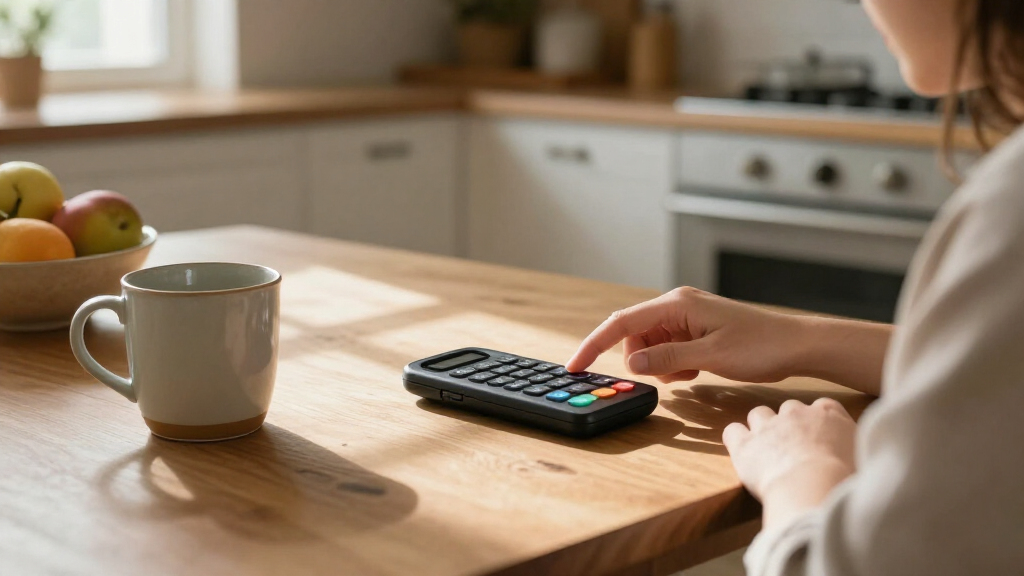
A button-based speech device fits best when the person can reach and select its controls accurately, comfortably, and consistently. Button size and spacing matter, as do the force needed to activate a control, its placement, and the screen or device angle. A layout that works briefly but causes strain or repeated errors can make communication slower and less dependable over a full day.
Direct touch may work well for one person, while another may use a stylus, keyguard, switch, or alternative pointing approach. Do not assume that a larger button is always easier: if buttons crowd together, a person may activate the wrong one; if they sit too far apart, reaching each may take extra effort. A keyguard can help separate choices, but its openings and fit need to suit the user. Each adjustment trades speed, accuracy, and physical effort differently, so the useful question is which arrangement lets this person communicate with the least friction.
Try the device where it will actually be used. For example, a person who selects accurately at a quiet table may find the same layout awkward when the device sits on a wheelchair mount at a different angle. The change in reach or viewing angle can affect both accuracy and fatigue. A specialist can help compare positioning and access methods, including an occupational therapist or other access professional where available.
Notice the physical details during a trial: repeated misses, a hand that tires, a stylus that slips, or a mount that blocks the view. If the user uses a switch, check whether its location is reachable across ordinary activities, not just during a short demonstration. A few successful selections at the start do not show whether the method will remain comfortable after many choices.
Record what you observe with the user’s input. A calm, repeatable selection method can matter more than adding extra buttons. The goal is to make communication available with a comfortable movement the person can use in daily life, including when their posture or surroundings change.
Compare what the buttons let the person say
Compare devices by the range of messages they support, not by the number of buttons alone. Some offer a few fixed buttons with prerecorded phrases; others use symbols or text, dynamic displays, and synthesized speech to let a person create more varied messages. Button count is only a snapshot of the layout; it does not show whether the person can find words, combine them, or say something the designer did not anticipate.
A simple button that says “I need help” can be useful in a specific routine. But if the person also wants to ask a question, disagree, tell a story, or make a joke, a fixed set of requests may leave too much unsaid. Flexible vocabulary can open more choices, although it may take practice to learn the layout and find words quickly. That learning time is a real tradeoff: a smaller set may be quicker at first, while a flexible system can support more independent expression as the user and partners gain experience.
Imagine a student who has a button for “break” but no way to say “I want to finish this first.” The first phrase supports a clear need; the second gives the student a way to express timing and preference. A good vocabulary can include familiar, quick phrases alongside ways to build messages the team could not predict in advance. This matters because having a way to refuse, clarify, or add a personal comment gives the user more control over a conversation.
Symbols, spelling, and text-to-speech offer different routes to language. The user’s literacy, vision, language experience, and preferences can help guide a trial, but no single format defines who can use AAC. The person may need support learning a layout, and communication partners can model how to use it naturally during the day. A layout that appears simple to an observer may be hard to navigate at conversational speed, so judge it by the user’s experience rather than its appearance.
Check whether vocabulary can be changed as interests and routines evolve. A device should give the person ways to comment, ask questions, socialize, and share ideas—not only request objects or actions. That breadth can make the difference between a tool for transactions and a way to take part in life, while the ability to add vocabulary helps keep the system relevant as the person’s world changes.
Choose a voice and language that feel like the user
Choose a speech device voice by listening to how it says the words and languages the person will use every day. Check pronunciation, available languages and dialects, speaking rate, volume, and whether the system lets you personalize recorded phrases.
Recorded speech can preserve the tone of a familiar speaker or the user’s own voice when recordings are available. It also requires someone to record phrases in advance, so an unexpected message may not be ready. Synthesized speech can speak messages the person creates on the device, though voice options and pronunciation vary across systems.
Try the voice in ordinary situations. A phrase that sounds clear in a quiet room may be difficult to understand in a busy cafeteria, where cups clatter and people talk over one another. If the person uses more than one language, test everyday phrases in each language rather than relying on a short sample.
The voice carries identity as well as words. A child may care whether it sounds too young, and an adult may prefer a voice that reflects how they want others to hear them. Offer choices where possible and give the user time to listen; the person who will rely on the voice should have a say in selecting it.
Check how easily the volume and voice settings can be adjusted for different spaces. A quiet setting may suit a shared room at home, while a community event may call for louder output. Those details make the difference between a voice that technically works and one the person feels comfortable using.
Match the device to home, school, work, and outings
Choose a device that can travel through the person’s real day: check its durability, weight, battery life, volume, mounting options, and portability. Consider where it will sit, how it will be carried, and whether people can hear it in the places where conversations happen. These practical details affect whether the device is present and usable when the person has something to say.
A tablet app may feel familiar and offer flexible layouts, while dedicated hardware may be built for more demanding communication routines. The tradeoff depends on the setting. For example, a family might use a tablet app comfortably at the kitchen table, yet need to examine its protection and mounting before relying on it through a full school day. Familiarity and flexibility can make a tablet appealing, while durability and reliable access may matter more when it is used constantly or in varied environments.
Ask how long the battery lasts in ordinary use, whether the device can be charged during the day, and what happens if a case or mount fails. A device that is too heavy to carry or difficult to position may stay in a bag. A device that is not loud enough for a busy space may be available but hard for others to hear. Planning for charging and backup access helps prevent these practical limits from becoming interruptions to communication.
Try it in more than one place when possible. At home, check reach and sound across a meal. At school or work, consider where the person sits and whether there is a safe place to store or charge it. On an outing, check whether a mount or case makes it easier to carry and use. A solution that works in one setting may require different placement or accessories elsewhere, so compare the whole routine rather than one demonstration.
Compare the complete setup, including accessories, rather than judging the screen alone. Hardware, app, case, mount, and charging plan work together like parts of one daily routine. Current product specifications and funding policies can change, so verify details directly before making a decision.
Run a practical trial before choosing
A useful device trial compares a few options in everyday situations and records what the person can comfortably access and communicate. When available, a speech-language pathologist (SLP), often working with an AAC team, can help arrange and guide trials.
- Pick real communication goals. Write down messages the person wants for a meal, a classroom activity, a work task, or a social visit.
- Try different access methods. Compare direct touch, a keyguard, a stylus, switch access, or another appropriate method with guidance from an access specialist where available.
- Use the device across ordinary routines. Check how it works at the table, in a noisy room, or with the user’s usual seating and mount.
- Ask the person what felt comfortable. Note preferences, effort, missed selections, and whether the voice and vocabulary felt useful.
- Review support and cost. Check training, repairs, warranty, accessories, and possible funding requirements before deciding.
For example, a person might test a direct-touch layout at home and a switch-access system during a familiar activity. The trial can show whether one method supports more reliable selections in each setting. Make space for the user to explore and communicate without asking them to prove they are ready.
Partners also affect the trial. Keep the device nearby, allow time for replies, learn where common messages sit, and model use without taking over. A partner who waits through a pause gives the user more room to make their own choice.
Write down observations that help distinguish convenience from access. The user’s comfort, communication range, and ability to participate matter alongside technical performance. A good trial turns a list of possible features into evidence about how the device fits one person’s life.
Plan for support, customization, and changing needs
Choose a system that the user and their communication partners can learn to set up, customize, and maintain. Ask what training, technical support, repairs, warranty, and replacement options are available before relying on it every day. Support matters because even a well-matched device can become difficult to use if a setting changes, a button stops responding, or no one knows how to restore a familiar layout.
Vocabulary and access needs can change. A person may want to add names of classmates, a new hobby, or phrases for an unfamiliar work routine. Check whether someone can update words, alter the button arrangement, and adjust access settings as needed, and whether those changes require specialist help. Easy customization can keep the user’s language current; changes made without a plan, however, can move familiar buttons and make the device harder to navigate. Agree on how updates will be made and involve the user in them.
Picture a new employee whose device already supports greetings and requests but lacks the words for a team meeting. If the system allows the user or support team to add relevant vocabulary, it can adapt to new responsibilities. A fixed layout may be easier to manage at first, but a layout with no path to growth can close off future choices. The right balance depends on how much flexibility the person needs and what support is available to maintain it.
Ask how communication partners can model use and keep the device available. A family member, teacher, or coworker does not need to speak for the user; they can learn the layout, demonstrate messages, and wait for the person to respond. Respecting all communication attempts supports dignity and participation. Partner training also helps the device become part of ordinary conversation rather than something brought out only for practice.
Funding and coverage rules vary by location and payer. Ask the relevant provider or funding agency about current assessment, documentation, supplier, trial, and accessory requirements. Include software, accessories, repairs, and replacement costs in the budget so the plan reflects the full cost of keeping the system usable. A lower initial price may not be the lower-cost choice over time if the setup needs frequent repairs or paid support.
Frequently Asked Questions
A simple button may play one or a few recorded messages. A more complex speech-generating device can offer a larger vocabulary, synthesized speech, and ways to build messages that were not recorded in advance.
How many buttons should a speech device have?
There is no universal number. The right layout depends on the person’s vision, movement, language, experience, and communication goals, so a specialist-guided trial can help compare arrangements.
Should I choose recorded or synthesized speech?
Recorded messages can preserve a familiar speaker’s tone but need to be prepared ahead of time. Synthesized speech can read messages the person creates, while voice quality and language choices vary by system.
Can someone use a speech device if they can speak?
Yes. AAC can support communication when speech is difficult, tiring, unreliable, or not understood, and it can be used alongside speech and other communication methods.
Is a tablet app enough, or should I choose dedicated hardware?
It depends on the person’s settings and needs. Compare access methods, durability, sound, portability, customization, reliability, and support, then check how each option works in daily routines.
Will insurance or another funding source pay for the device?
Funding rules vary by location and payer. Ask the relevant agency or provider which assessment, documentation, supplier, trial, and accessory requirements apply now.
Conclusion
Choose the device that gives the person a comfortable way to say what matters across the places they live, learn, work, and connect. Include their preferences, test real routines, and plan for vocabulary and access to change over time.
A useful device should make more of the person’s thoughts available to others. Keep it within reach, give them time, and let their own words lead.