
TL;DR

Get everyday helpers delivered free with Prime
- Fast, free delivery on millions of items
- Prime Video, Amazon Music and more included
- Member-only deals all year
A useful daily reminder whiteboard is easy to see, read, reach, and update. Start with one clear purpose, choose a surface and layout that suit the space, and build in a short reset routine; use digital alerts for urgent or private reminders.
Pick one main job for the board and add sections only when they solve a real problem.
Choose a size and lettering people can read from their usual viewing distance, leaving room between reminders.
Compare board surfaces by frequency of use, cleaning needs, visibility, installation, and budget.
Place the board along an existing routine and at a height its users can see and reach.
Set a short, predictable reset time; use separate tools for urgent alerts and private information.
A practical guide · Home & work
Choosing a Whiteboard System for Daily Reminders
Make everyday tasks easier to see, share, and update. Choose a board around one clear purpose, the place people will use it, and a quick routine for keeping it current.
At a glance
Five choices that make reminders work
Pick one main job. Add a section only when it solves a real problem.
Size the board and lettering for the distance people usually read from.
Compare cleaning, durability, visibility, installation, and budget.
Put it along an existing routine, at a height users can see and reach.
Set a short review time. Keep urgent alerts and private details elsewhere.
01 / Find the right job
Start simple. Add only what helps.
The board should answer a practical question at a glance: what needs attention today? A focused layout makes that answer easier to spot during a rushed moment.
Daily coordination
“Today”
Show the next pickup, an errand after work, and who is making dinner. Keep longer projects in their own tool.
Team tasks
To do → In progress → Done
Use columns when ownership and progress need to be visible. Names or initials can clarify who has the next action.
Personal routine
A short sequence
List a few steps in order when the useful question is “What comes next?” Keep phrases brief and plain.
Start with the smallest layout that supports the routine. Add a section when people repeatedly need information the board does not show.
If a section stays blank, it may be using space and attention without helping. Too many categories make users learn extra conventions.
02 / Size & layout
Make the next action easy to find
Sketch the layout before buying. Choose enough room for clear writing and breathing space, then check legibility from the spot where people will actually read it.
Dated events
Calendar grid
Dates are easy to scan and compare. The tradeoff: a grid leaves less room for explanations.
Changing tasks
Open list
Flexible space suits shifting reminders. The tradeoff: deadlines may be harder to compare.
Shared routines
Three clear zones
“Today,” “This week,” and “Waiting on” can be a workable start. Keep only labels that change what someone should do.
Use large, plain lettering and short phrases, such as “Library books—by the door.” Step back to check readability.
White space separates reminders and leaves room for plans to change. Avoid duplicating a reminder unless someone keeps copies aligned.
03 / Compare surfaces
Choose for the routine, not the showroom
Board material affects cleaning, marker ghosting, durability, visibility, price, and installation. The best fit depends on which inconvenience matters most in your space.
| Surface | Often suits | Consider before choosing |
|---|---|---|
| Melamine | Light use and tighter budgets | Some boards may stain or retain faint marks with frequent use. |
| Porcelain / enamel | Busy shared spaces and frequent updates | Compare upfront cost and installation needs with expected durability. |
| Glass | A clean, modern look | Check glare, marker contrast, cost, and mounting weight. |
| Portable / magnetic | Reminders that need to move | Check usable writing area and whether the surface works with your markers. |
Use compatible dry-erase markers with strong contrast; dark colors are usually easier to read than pale ones. Keep markers, an eraser, and a cloth nearby.
Try marker visibility from a distance. Avoid permanent or specialty markers unless the surface is made for them; they can stain or damage a board.
04 / Placement & access
Put the board where the routine happens
Use readable lettering and strong contrast.
Make writing height comfortable for the users.
Use labels and layout consistently across contributors.
Do not rely on color alone to convey meaning.
05 / Keep it trustworthy
A brief reset beats a complicated system
Choose a predictable daily or weekly moment to remove completed items and update changed plans. A board full of last week’s notes quickly becomes background noise.
Scan the board at a routine time you already have.
Remove completed items and anything no longer useful.
Change plans and add only the reminders people need next.
Make sure the next action is visible and easy to understand.
Use a dependable alert system for time-critical reminders. A shared board may be missed when someone is away or in a hurry.
Keep medical, personal, or confidential records somewhere appropriate instead of displaying them in a shared area.
Photos or a digital board can help remote participants, but add a step and risk duplicate records if nobody maintains both.
Magnets, printed layouts, and accessories can adjust a plain board. A handwritten layout is often quickest to change.
Start with one job so your board stays useful
A daily reminder whiteboard works best when it has a clear job, such as showing today’s appointments, coordinating household chores, or displaying a morning routine. Choosing a whiteboard system for daily reminders starts with deciding what information people need to see at a glance. If the board tries to manage every task, idea, appointment, and long-term plan at once, its most useful message can disappear in the clutter. That is more than a cosmetic problem: if people have to search or interpret the board, they are less likely to check it during a rushed moment, and missed reminders can weaken trust in the whole system. For example, imagine a household where two adults and a teenager share school pickups, meal plans, and errands. A single section called “Today” might show pickup at 3:30, groceries after work, and who is making dinner. A longer project list could live elsewhere. The board then answers a practical question—what needs attention today?—without asking anyone to search through a wall of notes. Keeping longer-term planning elsewhere does mean information is split across tools, so people should know where to find it; the benefit is that the board remains focused on the decisions that matter now. Before you shop, write down the board’s main purpose and who will use it. Decide whether it needs to hold a few changing tasks or a full week of dated events. That answer shapes the size, format, and location. A team tracking tasks may benefit from columns such as “To do,” “In progress,” and “Done,” while a personal morning routine may need only a short sequence of steps. The right format reflects how people act on the information: a task board makes ownership and progress visible, while a routine list makes order visible. Adding both can help when both needs are real, but each extra category uses space and asks users to learn another convention. Keep the first version simple. You can add a section after you notice a real need; removing categories after everyone has started using them can be harder. The best starting layout is the smallest one that supports the routine you want to make visible. Treat it as a practical trial: if people repeatedly ask for information the board does not show, that is evidence to adjust it; if a section stays blank, it may be taking attention and space without helping anyone.Popular right now

Dyson W1 PencilWash Cordless Wet and Dry Floor Cleaner with Dock

Dreame H12 Pro Wet and Dry Vacuum Mop

Shark HydroVac MessMaster Cordless Wet Dry Vacuum and Mop Combo, AW261
As an affiliate, we earn on qualifying purchases.
Choose a size and layout people can read quickly
Choose a board with enough room for the reminders people need to read at their usual viewing distance, while leaving space between items. Choosing a whiteboard system for daily reminders means sizing it around the wall, the writing, and the readers—not just the number of tasks. If people need to walk up close to decode cramped handwriting, the board may not be doing its job. A larger board can solve that problem, but only if it fits where people will see it; a board that dominates a small room or blocks a useful route may be ignored or become an obstacle. Try sketching a layout on paper before buying anything. For many shared routines, three areas—“Today,” “This week,” and “Waiting on”—offer a workable start. A calendar grid can make dated events easier to scan, while an open layout gives changing tasks more room. A parent coordinating appointments might use a monthly calendar for dates and a small “Today” area for the next pickup and dinner plan. The tradeoff is that a grid organizes dates neatly but can leave little room for explanations, while an open list is flexible but may make deadlines harder to compare. Choose based on the decision readers need to make, and avoid duplicating the same reminder in several places unless someone is responsible for keeping those copies aligned. Leave breathing room around the writing. A board filled from corner to corner can feel like a wall of demands, and new reminders have nowhere to go. Use large, plain lettering and short phrases: “Library books—by the door” is faster to understand than a detailed paragraph. Step back to the distance where someone is likely to read it and check whether the writing remains clear. White space is useful working room: it separates items, helps the eye find the next action, and gives plans space to change without rewriting the whole board. If several people contribute, agree on a few labels and where each type of information belongs. Names or initials can show who owns a task when that helps; they don’t need to appear beside every reminder. A predictable layout means people can find information quickly, even when the house is busy and someone has only a moment to check. Too many labels create their own learning burden, so keep only the distinctions that change what someone should do. Review whether users can locate a reminder without asking; that is a better measure of layout clarity than how polished the board looks.Compare surfaces by how you’ll use them
Melamine, porcelain or enamel, and glass surfaces suit different budgets and routines, so compare how they handle frequent writing, cleaning, and visibility. Choosing a whiteboard system for daily reminders involves a real trade-off: a lower upfront cost may work well for light use, while a more durable surface may make sense when many people write and erase every day. The price of the board is only one part of the choice. A surface that becomes hard to clean can make reminders less legible and add friction to every update; a heavier or more expensive board can impose costs in installation and space. A melamine board is usually an affordable starting point. It can suit a quiet home office where reminders change once or twice a week, though some boards may stain or retain faint marks with heavy use. Porcelain or enamel surfaces generally resist wear better and can suit busy shared spaces. Glass offers a clean appearance, but reflections, marker contrast, cost, and mounting weight deserve attention before you choose it. In practice, the best surface depends on which inconvenience is most likely in your setting: frequent erasing may make durability valuable, while glare or difficult mounting can outweigh a glass board’s appearance. A board that is easy to write on but difficult for a particular reader to see is not an improvement. | Surface | Often suits | Check before buying | |—|—|—| | Melamine | Light use or a tighter budget | Cleaning guidance and reports of ghosting | | Porcelain or enamel | Frequent writing and erasing | Mounting requirements, weight, and price | | Glass | A polished, reusable writing surface | Glare, marker visibility, weight, and installation | For instance, a small family board that holds three daily reminders may not need the cost or weight of a large glass panel. A shared studio with frequent schedule changes may place more value on a surface designed for regular erasing. Product details differ, so check the maker’s marker and cleaning guidance for the specific board rather than relying on a material name alone. If possible, test marker contrast and glare in the actual room; showroom lighting and a product photo cannot show how the surface will look beside your window or under your overhead lights.Put the board where routines already happen
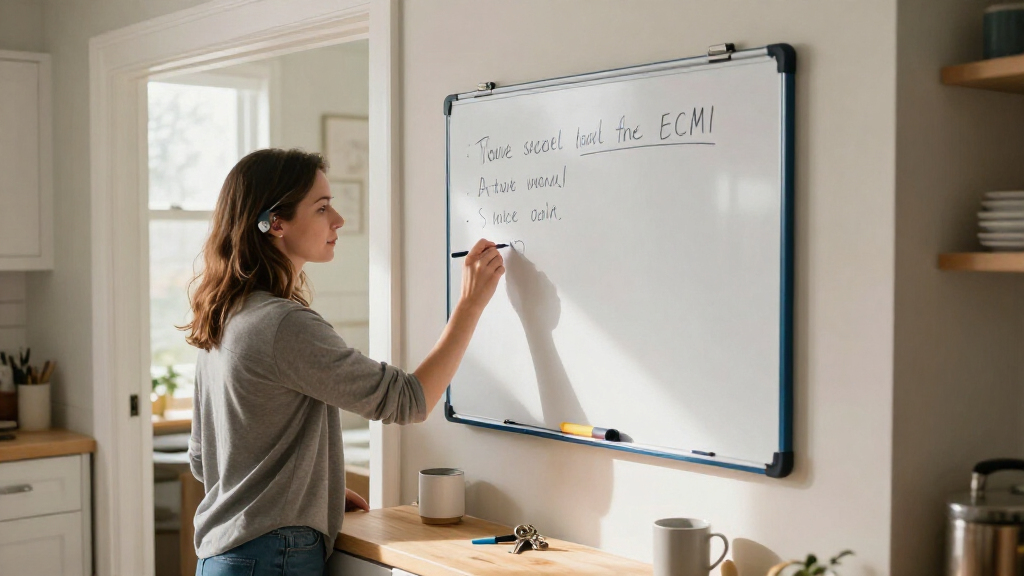
Place the board where its intended users naturally pass, with enough light and room to read and write comfortably. Choosing a whiteboard system for daily reminders includes choosing its location: a board tucked into a spare room may be out of sight, while one near the entryway can catch your eye before you leave. A location that works for one person may not work for everyone who needs the information. Placement affects whether a reminder becomes a cue for action: seeing “take lunch” beside the place where bags are collected connects the note to a moment when someone can act on it. Think through the moment a reminder matters. If someone needs to check for keys, lunch, or a bus pass, the entryway may work well. If the board guides a cooking routine, the kitchen could be easier to use. A team planning the day might place a board beside a shared work area where everyone can reach it during a morning check-in. The most convenient place for one reminder may be distracting or unsuitable for another, so a board with several purposes may need to be placed where users can pause without blocking a busy passage. Reach and readability matter as much as foot traffic. Choose a mounting height that lets the people who need the board see it and contribute where possible. Check for glare from a window or overhead light, and make sure a chair, doorway, or appliance doesn’t block the writing surface. If someone uses a wheelchair or has limited reach, test the actual position before fixing the board in place. A board that is visible but cannot be comfortably reached may turn participation into a request for help, which can slow updates and make the system depend on one person. Try a temporary setup first: lean a small board on a counter or mark its proposed wall area with paper. Notice whether people look at it without being prompted. If they keep walking past, moving it a few feet into the path of an existing routine can help more than adding another color or category. Observe the whole sequence—whether someone notices the reminder, can read it, and can act on it—because a location that supports only the first step may still leave the routine unfinished.Make the board easy for everyone to read and update
An accessible reminder board uses clear lettering, strong contrast, simple labels, and a layout that different readers can use. Choosing a whiteboard system for daily reminders should account for who needs to see, reach, and update it, including people with different vision, mobility, or communication preferences. A system that works only for the person who designed it can leave others out of the routine. That affects accuracy as well as inclusion: when only one person can comfortably add or interpret reminders, everyone else may have to rely on that person to relay changes. Use dark markers for most writing and test visibility from across the room. Pale colors can be difficult to distinguish on a white surface, and color alone should not carry meaning. If one color marks appointments, pair it with a written label or a symbol that makes sense to the people using the board. For example, write “appointment” beside a small star instead of relying only on a light blue marker. This gives people more than one clue, so a color difference that is hard to see does not hide what the note means. A small set of contrasting colors can still help group information, but adding many colors can make the system harder to remember and maintain. Keep labels familiar and instructions short. “Take folder” may be easier to scan than a sentence explaining why the folder matters. If handwriting varies, printed labels or a reusable template can make sections easier to find. Magnets can hold a note in place or mark a recurring routine, but only when the added pieces make information clearer rather than busier. The test is whether the aid reduces effort for its users; a template can save time, but a rigid template may be frustrating when plans change or someone needs a different format. Consider who can write on the board and whether a smaller portable board is more practical. Someone who cannot comfortably reach a wall-mounted board might prefer a board set on a table or a digital companion they can edit. The goal is meaningful participation: people should have a way to check and contribute that fits their abilities and preferences. A companion tool can improve access for someone working remotely or unable to reach the board, but it introduces a second place to update. Agree which copy is authoritative and how changes are shared so the accommodation does not create conflicting information.Build a quick reset into a routine you already have
A short, predictable review keeps a reminder board trustworthy by removing completed items and updating changed plans. Choosing a whiteboard system for daily reminders also means choosing who will maintain it and when; without that agreement, old information can linger until everyone stops checking. A brief reset tied to an existing habit is usually easier to keep than a separate, elaborate planning session. The review is not busywork: it closes the loop between a written plan and what actually happened, so people can judge whether the board still reflects reality. Try this five-step routine at the end of the day or during a weekly household check-in:- Erase tasks that are finished.
- Move unfinished items to the right day or list.
- Add known appointments and changes.
- Check that names or task owners are clear.
- Put the marker and eraser back beside the board.