
TL;DR

Get everyday helpers delivered free with Prime
- Fast, free delivery on millions of items
- Prime Video, Amazon Music and more included
- Member-only deals all year
Setting up smart lighting for accessibility involves choosing user-friendly systems, integrating voice control, automation, and adaptable hardware. Recent advances make it easier and more effective, helping users gain independence in daily living.
Imagine never fumbling for a switch in the dark again. Smart lighting isn’t just a cool gadget; it can be a lifeline for those with mobility, vision, or cognitive challenges. With the right setup, your home becomes a space that adapts to your needs, empowering you to move freely and safely.
This guide walks you through practical steps to create an accessible smart lighting environment. Whether you’re upgrading your current system or starting fresh, you’ll find clear, concrete advice to make your home brighter and more welcoming for everyone.
Choose smart lighting systems with simple controls and voice command support to maximize ease of use.
Automate lighting with motion sensors and routines to reduce physical effort and increase safety.
Adjust brightness and colors to meet individual visual needs, improving clarity and comfort.
Select hardware with tactile buttons or large controls for easier handling by users with motor impairments.
Prioritize compatibility and security to protect your home while integrating with other assistive tech.
How to Set Up Smart Lighting for Accessibility
Smart lighting can remove physical barriers, improve visibility and make everyday routines safer. The strongest setup combines simple controls, voice access, thoughtful automation, adaptable light scenes and a reliable manual fallback.
Control should work through the easiest available method—not force every user to reach, tap or navigate an app.
Choose features that reduce effort, prevent dark pathways and remain understandable during stress or fatigue.
Six decisions shape an accessible system
Start with the user’s abilities, routines and preferred controls. A technically advanced system is only accessible when its everyday actions are easy to discover, repeat and recover.
Choose simple controls
Look for a clear app, screen-reader support, memorable room names and controls that require few steps.
Test: can the user turn on one room quickly?Add voice access
Connect Alexa, Google Assistant or Siri and create short commands that match the user’s natural language.
Example: “Turn on the hallway”Automate key routes
Use motion or occupancy sensors in entrances, hallways, bathrooms and other high-risk transition areas.
Goal: remove dark gaps between roomsTune light scenes
Adjust brightness and warmth for reading, movement, glare reduction, relaxation and nighttime orientation.
Save scenes instead of repeated adjustmentsUse tactile hardware
Prefer large raised buttons, clear contrast, tactile feedback and controls that stay usable without a phone.
Keep a physical fallback in every key zoneCheck compatibility
Confirm that bulbs, switches, sensors, hubs and assistive devices work together before expanding the system.
Consider Zigbee, Z-Wave or Matter supportFrom one bulb to a reliable routine
Begin with a small pilot room. Confirm each control method works for the intended user, then duplicate the pattern across the home.
Map needs
Identify mobility, vision, dexterity, memory and sensory requirements.
Name rooms
Use short, distinct names that are easy to say and remember.
Connect controls
Pair bulbs, switches, voice assistants and adaptive inputs.
Create routines
Add schedules, motion triggers and personalized scenes.
Test together
Adjust timing, sensitivity, brightness and fallback access.
Keep phrases short and predictable
Custom routines can convert several actions into one memorable instruction. Avoid room names that sound alike.
Match the interface to the user
No single control method works for everyone. Layering several options creates resilience when speech, movement, connectivity or attention varies.
| Control method | Mobility support | Vision support | Cognitive load | Best use | Watch for |
|---|---|---|---|---|---|
| Voice command | ✓ Strong | ✓ Strong | ~ Low–medium | Hands-free room control | Speech recognition and internet dependence |
| Motion sensor | ✓ Strong | ✓ Strong | ✓ Low | Hallways, bathrooms and entrances | False triggers and abrupt changes |
| Large tactile switch | ~ Medium | ✓ Strong | ✓ Low | Reliable physical fallback | Reach height and required pressure |
| Mobile app | ~ Medium | ~ Variable | ~ Medium–high | Detailed setup and scene editing | Small targets and complex navigation |
| Scheduled routine | ✓ Strong | ✓ Strong | ✓ Low | Consistent morning and evening patterns | Changes in routine or daylight |
Brightness is an accessibility setting
More light is not always better. Tune each scene for the task, the person and the time of day, then test for glare, shadows and sudden transitions.
Gentle warm light can reduce glare and support orientation without making a room feel harsh.
Balanced general lighting helps reveal obstacles, edges and transitions between spaces.
Bright, directed light can support reading, cooking and detailed work when positioned to avoid reflections.
Reading
Bright task lighting, even coverage and reduced shadows across the page.
Night route
Low-level pathway lighting that activates gradually between bed and bathroom.
Visual cue
A distinct light change can reinforce a doorbell, timer or daily routine.
Automate repetitive actions, but preserve an obvious way to override the automation.
Connect the trigger to a safe outcome
Every automation should be understandable from beginning to end. This makes faults easier to diagnose and helps users predict what the home will do.
Recent developments expand access
Newer systems are becoming easier to install, more adaptive and more compatible with assistive technologies—but user testing remains essential.
Broader recognition
Systems increasingly accommodate varied accents and speech patterns.
Adaptive routines
AI-assisted systems can respond to recurring behavior and preferences.
Connected alerts
Lighting can reinforce doorbells, security systems and emergency signals.
Wireless DIY kits
Affordable bulbs and sensors reduce the need for electrical work.
Adaptive inputs
Specialized remotes and switches support more physical access needs.
Before expanding the system
Run this short review with the person who will use the lighting. Their real-world experience should determine whether the setup is ready.
Test every control path
Confirm voice, sensor, app and physical controls each perform the expected action.
Prevent sudden darkness
Use sensible timeouts and overlapping coverage on stairs, hallways and bathroom routes.
Secure connected accounts
Use unique passwords, two-factor authentication and current device firmware.
Keep controls recognizable
Add clear labels, tactile markers or strong contrast where they improve independent use.
Plan for outages
Make sure essential lights can still be operated when Wi-Fi, cloud services or voice control fail.
Review after one week
Adjust sensor placement, timing, commands and brightness using everyday experience.
Choose Easy-to-Use Smart Lighting Systems That Fit Your Needs
The first step is selecting a system that’s intuitive and reliable. Look for products with simple controls, clear app interfaces, or voice command options. For example, a homeowner with arthritis might prefer smart bulbs that respond to voice commands rather than physical switches.
Many systems support major voice assistants like Amazon Alexa, Google Assistant, or Apple Siri. These allow for hands-free control, perfect for anyone with limited dexterity.
For instance, a client with limited hand strength installed smart bulbs compatible with Alexa, enabling them to turn on lights with a quick voice command—”Alexa, turn on the living room light.”
smart lighting voice control system
As an affiliate, we earn on qualifying purchases.
As an affiliate, we earn on qualifying purchases.
Set Up Voice Control So You Can Switch Lights Without Lifting a Finger
Voice control is a game-changer for accessibility. You can command your lights to turn on, dim, or change color with simple spoken phrases. The key is linking your smart lighting to a voice assistant and customizing commands to fit your routine.
Start by connecting your smart bulbs to your chosen voice platform. Place your voice assistant device in a central location. Then, create custom routines—like “Good night,” which dims all lights and turns them off in sequence.
Picture this: You’re cozy in bed, and a simple “Turn off the lights” command powers down your entire home lighting system, no need to get up or reach for a switch.
As an affiliate, we earn on qualifying purchases.
Automate Lighting to Reduce Physical Interactions
Automation makes your home smarter—and safer. Motion sensors or occupancy routines can turn lights on automatically when you enter a room and turn off when you leave. This reduces the need for physical switches, especially helpful for those with mobility issues.
For example, installing motion detectors in hallways and bathrooms means lights activate the moment you step inside. This not only prevents stumbling in the dark but also conserves energy by ensuring lights aren’t left on unnecessarily. However, it’s important to balance automation with control options, as overly sensitive sensors might trigger lights unexpectedly, which can be disorienting for some users. Proper placement and adjustable sensitivity help optimize this balance, ensuring safety without frustration.
One homeowner installed a motion-activated system in their kitchen, which brightened the space instantly when they entered—perfect for cooking or reaching for a snack late at night.
As an affiliate, we earn on qualifying purchases.
Customize Brightness and Colors to Fit Visual Needs
Adjusting brightness and colors isn’t just for mood—it’s a vital accessibility feature. Brightness controls can help users with low vision see more clearly, while color-changing lights can provide visual cues or aid in relaxation.
For example, a person with light sensitivity might set their living room to a gentle 20% dimness, reducing glare and making it easier to see objects or read. Conversely, someone with color vision deficiencies might choose high-contrast scenes or specific hues that enhance differentiation between objects or signs. High-contrast lighting scenes, such as stark white against dark backgrounds, can significantly improve visibility for users with low vision. Additionally, color-coding lighting scenes—like red for alerts or green for relaxation—serves as visual cues, making navigation and daily routines more intuitive. Properly customized lighting can reduce confusion, enhance safety, and foster independence by helping users interpret their environment more easily.
Many smart bulbs allow you to preset scenes—like a bright white for reading or a warm amber for winding down—making it easier to adapt your environment quickly and effectively.
As an affiliate, we earn on qualifying purchases.
Pick Hardware Designed for Accessibility — Larger, Tactile, and Clear
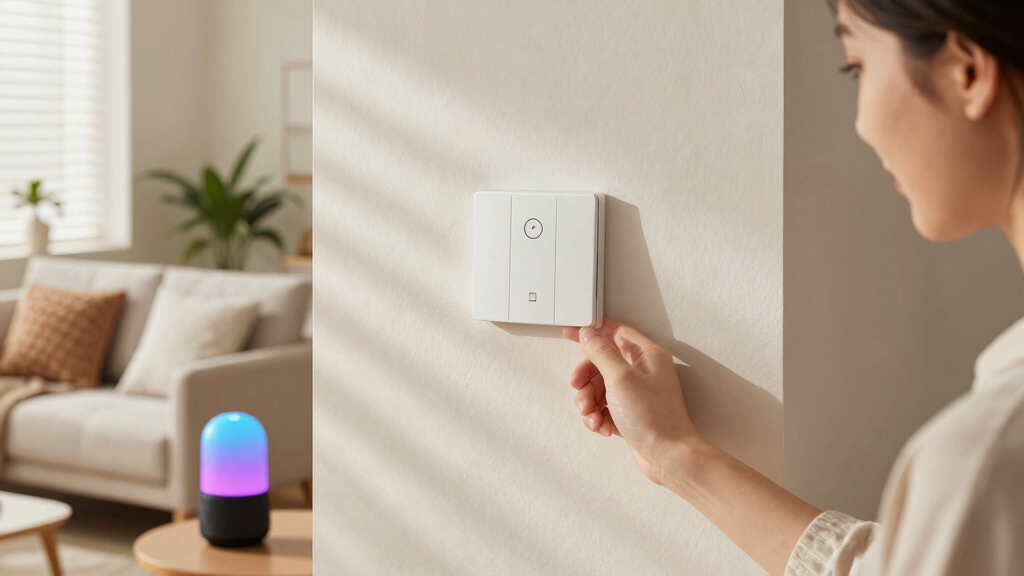
Hardware matters. Look for devices with tactile buttons, large controls, or visual indicators that help users with vision or motor impairments. For example, a smart switch with big, raised buttons is easier to locate and press than a tiny toggle.
Some smart bulbs come with remote controls featuring oversized buttons or tactile feedback, making adjustments straightforward. Additionally, consider hardware with clear labeling or contrasting colors to aid recognition. For users with limited dexterity, devices with fewer steps or simplified interfaces reduce frustration and the risk of errors. Choosing hardware that is physically easier to handle not only enhances independence but also minimizes the risk of accidental activation or damage, ensuring consistent and reliable operation.
Imagine someone with limited finger mobility adjusting lighting with a large, textured button that responds instantly—no fumbling, no frustration.
Ensure Compatibility and Security for Peace of Mind
Compatibility is key—your smart lighting should seamlessly connect with your existing devices and platforms. Open standards like Zigbee or Z-Wave offer greater flexibility, allowing you to mix and match devices without being locked into a single brand. This flexibility is crucial because it enables you to customize your system based on your specific needs and existing devices, reducing frustration and increasing reliability. For example, a homeowner with a Google Nest system can add compatible smart bulbs that integrate effortlessly, creating a cohesive ecosystem that simplifies control and reduces setup complexity. Compatibility also affects future upgrades and scalability, so choosing a flexible system prevents obsolescence.
Security is just as important. Use strong, unique passwords for your accounts, enable two-factor authentication where available, and regularly update device firmware. This helps protect your home from hacking and unauthorized access, which is especially critical when devices are connected to your personal data and daily routines. Neglecting security can expose vulnerabilities, risking privacy breaches or malicious control of your system. Investing time in secure setup practices safeguards your home and preserves your peace of mind. Remember, a well-protected system not only keeps your data safe but also ensures your safety from potential cyber threats that could disrupt your environment.
One family learned the hard way—an unsecure setup led to unauthorized access. Now, they prioritize reputable brands and regular updates to keep their system safe, illustrating the importance of security in smart home technology.
Explore Recent Advances Making Smart Lighting More Accessible
Smart lighting keeps getting better. Recent innovations include AI-powered routines that learn your habits, voice recognition that understands diverse accents, and integration with emergency alerts. These features make a home truly adaptive.
For instance, AI can suggest lighting scenes based on your daily patterns, such as dimming in the evening or brightening in the morning. Voice technology now recognizes different speech patterns, making commands easier for everyone, regardless of accent or speech impairment. Emergency integration can automatically activate specific lighting scenes during alarms or power outages, enhancing safety without manual intervention. Wireless, DIY-friendly kits make it easier to retrofit your home without professional help, expanding accessibility options for all budgets. These advancements ensure that smart lighting remains inclusive, intuitive, and responsive to evolving needs, ultimately promoting greater independence and safety for all users.
Frequently Asked Questions
What are the best smart lighting options for accessibility?
Look for systems compatible with major voice assistants like Alexa, Google, or Siri. Features like automation, adjustable brightness, and tactile controls make a system more accessible. Brands such as Philips Hue and LIFX are popular choices.How do I set up smart lighting for someone with limited mobility?
Use voice commands, automation routines, and remote controls to minimize physical effort. Position voice assistants in central locations and create routines that turn lights on/off with simple phrases.Can smart lighting help with visual impairments?
Yes. Adjustable brightness and color-changing features can enhance visibility and provide visual cues. Setting high contrast scenes or gentle hues can make environments more navigable.Are smart lighting systems secure and private?
Reputable brands use encryption and security protocols. Always use strong passwords, enable two-factor authentication, and keep firmware up to date to protect your system.What is the cost of setting up accessible smart lighting?
Costs range from around $15 for individual smart bulbs to several hundred dollars for comprehensive systems with sensors and hubs. DIY kits are affordable and customizable.Conclusion
Smart lighting can fundamentally change how accessible your home feels. With a few thoughtful choices—like voice control, automation, and user-friendly hardware—you create a space that adapts to your needs, not the other way around.
Remember, a brighter home isn’t just about lights—it’s about lighting up independence and confidence. Start small, think smart, and let your home do the heavy lifting.
Fall Picks
fall essentials
As an affiliate, we earn on qualifying purchases.