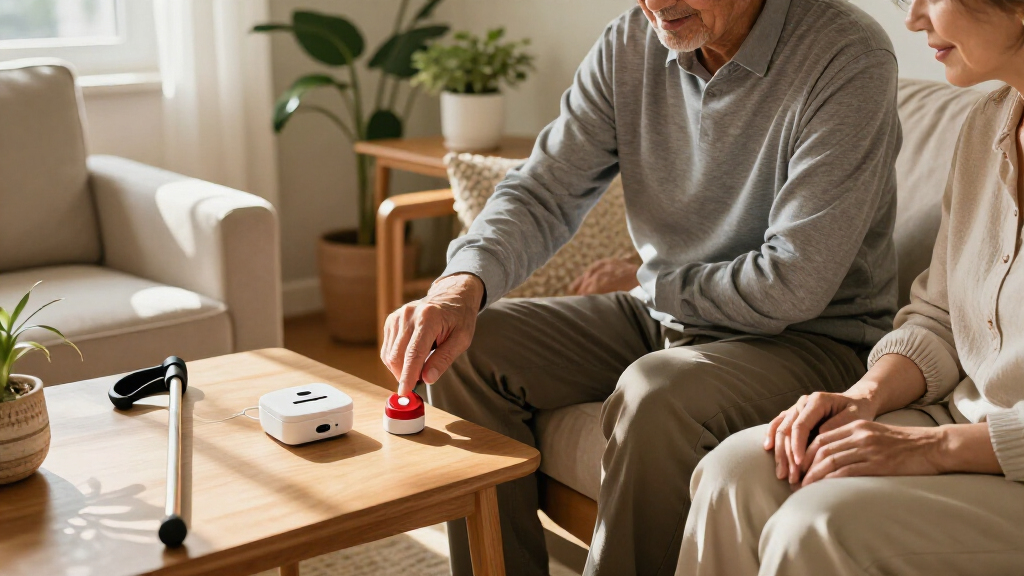

The best home emergency alert systems depend on whether you need a simple room-to-room caregiver signal or a device that can call for help beyond the home. I rank the CallToU Wi-Fi Caregiver Pager with Call Button, Watch Button, and Receiver as the best overall for its mix of wearable and fixed call options. The SecuLife Medical Alert Pendant stands out for GPS and two-way calling, while the Freedom Alert Landline Personal Emergency Device suits households that prefer a landline-based setup. The central tradeoff is reach: local pager kits can alert someone nearby without providing outside monitoring, while mobile devices offer broader coverage but bring connectivity, charging, and service questions. Read on for the full breakdown, buying criteria, and guidance for matching a system to your home and support plan.

Get everyday helpers delivered free with Prime
- Fast, free delivery on millions of items
- Prime Video, Amazon Music and more included
- Member-only deals all year
Key Takeaways
- The CallToU Wi-Fi kit ranks first because it pairs a fixed call button with a wearable watch button and receiver, giving caregivers more than one way to hear an alert at home.
- SecuLife and Medical Guardian MGMini are better matches when help may be needed away from home; GPS and two-way calling address a different need from a local receiver.
- Freedom Alert and LogicMark Guardian Alert 911 Plus represent a more independent response approach, but buyers should check how each device connects and who answers an alert.
- The CallToU, FullHouse, and DAYTECH kits show that similar-looking pager systems can differ by included buttons, wearable options, receiver count, and Wi-Fi dependence.
- The SINGCALL strobe siren and Greetmed dual-receiver kit suit homes where alert visibility or coverage across rooms matters more than mobile tracking.
| CallToU Wi-Fi Caregiver Pager with Call Button, Watch Button, and Receiver |  | Best for Shared App Alerts | Brand: CallToU | Model: TY01WH-US 2-1 | Included components: 1 call button, 1 watch button, 1 receiver | VIEW LATEST PRICE | See Our Full Breakdown |
| CallToU Wi-Fi Caregiver Call Button Emergency Alert System |  | Best for Multiple Call Points | Brand: CallToU | Model: TY02BL | Included devices: 2 call buttons, 1 wrist button, 1 receiver | VIEW LATEST PRICE | See Our Full Breakdown |
| CallToU Caregiver Pager Wireless Alert Button | 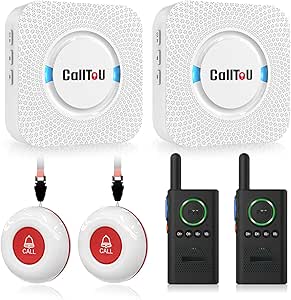 | Best for Two-Way Household Communication | Included components: 2 call buttons, 2 receivers, 2 walkie-talkies | Maximum range: Up to 500 feet outdoors; recommended under 300 feet indoors | Audible noise level: Up to 110 dB | VIEW LATEST PRICE | See Our Full Breakdown |
| FullHouse Wireless Caregiver Pager with Emergency Call Button and Wristband |  | Best No-Monthly-Fee Local Pager | Brand: Full House | Range: Up to 1,000 feet in open air; 500 feet through walls | Melodies: 52 | VIEW LATEST PRICE | See Our Full Breakdown |
| SecuLife Medical Alert Pendant for Seniors with Fall Detection, GPS Tracking and Two-Way Calling |  | Best for Mobile Emergency Monitoring | Connectivity: 4G LTE cellular | Emergency features: Fall detection, SOS calling, and two-way calling | Location features: GPS tracking and geofencing | VIEW LATEST PRICE | See Our Full Breakdown |
| Freedom Alert Landline Personal Emergency Device |  | Best for Landline-Based Two-Way Help | Connection: Landline phone service required | Communication: Two-way voice via pendant | Pendant battery: Rechargeable | VIEW LATEST PRICE | See Our Full Breakdown |
| SYNLETT Caregiver Pager with 2 Wireless Call Buttons |  | Best Simple Two-Button Caregiver Pager | Model: D091G1 | Included components: 2 call buttons and 1 receiver | Power source: Battery powered | VIEW LATEST PRICE | See Our Full Breakdown |
| DAYTECH Wi-Fi Caregiver Call System with 2 Buttons, Wrist Button, and Receiver |  | Best for Shared App Alerts | Model: CR02TY-CT02WR-WB06WH | Included components: 2 buttons, 1 wrist button, and 1 receiver | Wi-Fi: 2.4 GHz only | VIEW LATEST PRICE | See Our Full Breakdown |
| SINGCALL Remote Emergency Strobe Siren Alarm Kit with 4 Emergency Buttons |  | Best for High-Visibility Household Alerts | Model: J008 520C | Included components: 2 sirens and 4 emergency buttons | Power source: Battery powered | VIEW LATEST PRICE | See Our Full Breakdown |
| Greetmed Wireless Caregiver Pager System with Dual Receivers and Two SOS Transmitters |  | Best for Two Caregiver Locations | Model: GT-CP22 | Receivers: 2 | Transmitters: 2 | VIEW LATEST PRICE | See Our Full Breakdown |
| CallToU Caregiver Pager Wireless Call Button Nurse Alert System |  | Best for Bathroom Coverage | Wireless range: 500+ ft through walls | Sound level: Adjustable up to 110 dB | Ringtones: 55 selectable | VIEW LATEST PRICE | See Our Full Breakdown |
| Medical Guardian MGMini Medical Alert Device for Seniors, Black |  | Best for Monitored Mobile Help | Connectivity: Cellular and Wi-Fi backup | Monitoring: 24/7 service; subscription required | Communication: SOS button and two-way speaker | VIEW LATEST PRICE | See Our Full Breakdown |
| LogicMark Guardian Alert 911 Plus Emergency Pendant with Fall Detection |  | Best No-Monthly-Fee Emergency Pendant | Network: 4G LTE | Communication: Two-way voice | Fall detection: Included | VIEW LATEST PRICE | See Our Full Breakdown |
| FullHouse Wireless Caregiver Pager with Emergency Call Button |  | Best for Flexible In-Home Alerts | Maximum range: Up to 1,000 ft open air; about 500 ft through walls | Volume: Five levels, up to 110 dB | Melodies: 52 | VIEW LATEST PRICE | See Our Full Breakdown |
More Details on Our Top Picks
CallToU Wi-Fi Caregiver Pager with Call Button, Watch Button, and Receiver
I’d pick this CallToU for a household that wants a local receiver and app notifications at the same time. The call button and watch button provide two ways to request help, while the receiver’s audible and visual alerts give a nearby caregiver a signal even when the phone is elsewhere. Free app notifications can be shared with family, a useful distinction from the FullHouse Wireless Caregiver Pager, which relies on its local receiver and does not list app alerts. The tradeoff is that this system depends on 2.4 GHz Wi-Fi for app connectivity, and phone or text alerts cost extra through a subscription. Its stated 328-foot button range is also a maximum, not a guarantee through walls. I’d skip it if you need cellular backup or subscription-free remote calls.
Pros:- Combines app notifications with audible and visual alerts from a receiver
- Free app notifications can be shared with family
- Includes both a call button and a wearable watch button
- Offers 20 ringtones and five volume levels
Cons:- App connection supports 2.4 GHz Wi-Fi only
- Phone and text alerts require a paid subscription
- The listed 328-foot range may be reduced by walls and other obstacles
Best for: Families who want several people to receive free app notifications while a caregiver nearby also hears a receiver alert.
Not ideal for: Households without 2.4 GHz Wi-Fi, or buyers who need phone and text alerts without a subscription.
- Brand:CallToU
- Model:TY01WH-US 2-1
- Included components:1 call button, 1 watch button, 1 receiver
- Wireless technology:433 MHz
- Wi-Fi compatibility:2.4 GHz only
- Maximum range:Up to 328 feet (100 m)
- Receiver alerts:20 ringtones; 5 volume levels
- Power:Battery powered; 2 AAA batteries included
- Warranty:1 year
Our verdict“Choose this model if shared app alerts and a local receiver matter more than cellular backup or subscription-free phone and text service.”
CallToU Wi-Fi Caregiver Call Button Emergency Alert System
With two call buttons, a wrist button, and one receiver, this CallToU kit suits a home where help may be needed from more than one room. Like the TY01WH-US 2-1, it pairs a local receiver with free Tuya app notifications, but this set gives caregivers more call points without buying separate buttons. Its 20 ringtones and five volume settings make it easier to distinguish or hear an alert around everyday household noise. That added coverage comes with the same network limits as the other Wi-Fi CallToU: 2.4 GHz Wi-Fi is required, and phone or text alerts require a subscription. Compared with the CallToU B0921HH5Q9, this is more app-oriented, while that model adds walkie-talkies and a longer stated outdoor range. Skip this if internet-free operation is a priority.
Pros:- Includes two call buttons and one wrist button
- Sends alerts to both the receiver and the Tuya app
- App notifications can be shared with family
- Receiver provides 20 ringtones and five volume levels
Cons:- Requires 2.4 GHz Wi-Fi for app connectivity
- Phone or text notifications require a subscription
- The stated 328-foot wireless range can be affected by indoor obstacles
Best for: Families who want call buttons in multiple locations, a wearable button, and shared app notifications for caregivers.
Not ideal for: Buyers seeking an internet-independent alert system or remote phone and text alerts without a subscription.
- Brand:CallToU
- Model:TY02BL
- Included devices:2 call buttons, 1 wrist button, 1 receiver
- Wireless technology:433 MHz RF
- Wi-Fi support:2.4 GHz
- Wireless range:Up to 328 feet (100 m)
- Receiver settings:20 ringtones; 5 volume levels
- Power:2 AAA batteries included
- Warranty:Lifetime warranty
Our verdict“Pick this set for several in-home call points and app sharing, but choose a non-Wi-Fi pager if you need alerts independent of internet access.”
CallToU Caregiver Pager Wireless Alert Button
This CallToU is the most communication-focused local pager in this group: it includes two receivers and two walkie-talkies, so a call can lead to a conversation rather than stopping at an alert. The system’s stated outdoor range reaches 500 feet, but the recommended indoor range is under 300 feet, making placement and walls relevant to a real home setup. Its waterproof and dustproof devices also suit locations where a basic Wi-Fi button, such as the CallToU TY01WH-US 2-1, may be less appropriate. That simplicity has limits: the pager and intercom functions are separate and cannot be paired, and there are no listed app notifications or GPS features. Compared with the SecuLife pendant, this is a household communication system, not a mobile medical alert with fall detection.
Pros:- Includes two call buttons, two receivers, and two walkie-talkies
- Walkie-talkies allow voice communication after an alert
- Waterproof and dustproof devices suit more locations around the home
- Offers 55 ringtones and adjustable volume up to 110 dB
Cons:- Recommended indoor range is under 300 feet, below the outdoor maximum
- Pager alerts and walkie-talkie functions cannot be paired
- No app notifications, GPS tracking, or fall detection are listed
Best for: Households with a nearby caregiver who wants a local alert system plus separate walkie-talkies for quick voice communication.
Not ideal for: People who need GPS tracking, automatic fall detection, app alerts, or a wearable cellular connection when away from home.
- Included components:2 call buttons, 2 receivers, 2 walkie-talkies
- Maximum range:Up to 500 feet outdoors; recommended under 300 feet indoors
- Audible noise level:Up to 110 dB
- Ringtones:55 selectable
- Water and dust protection:Waterproof and dustproof devices
- Receiver power:Plug-in
- Button mounting:Wearable as pendants or mountable with brackets
- Package color:White
Our verdict“Choose this for local alerts and separate two-way household communication, not for app-based monitoring or protection outside the home.”
FullHouse Wireless Caregiver Pager with Emergency Call Button and Wristband
The FullHouse makes a clear case for buyers who want a local alert without a monthly fee. Its receiver offers sound and LED alerts, including a silent LED-only mode that can avoid waking others or disrupting a quiet room. A stated open-air range of up to 1,000 feet is generous compared with the 328-foot claims for both Wi-Fi CallToU systems, although FullHouse lists a lower 500-foot range through walls. It also avoids their dependence on 2.4 GHz Wi-Fi, but gives up their app-based family notifications. The call button is splash-proof, not suitable for immersion, so bathroom placement needs care. I’d choose it over the app-connected CallToU models when simple local signaling and no recurring fee matter more than alerts sent to distant family members.
Pros:- No monthly fee is listed
- Offers sound, LED flash, and silent LED-only alert modes
- Stated range reaches 1,000 feet in open air
- Call button can be worn or placed near a bed, wheelchair, or bathroom wall
Cons:- Listed range falls to 500 feet through walls
- Call button is splash-proof and should not be immersed
- No app notifications or remote family sharing are listed
Best for: Caregivers who want a straightforward in-home pager with silent visual alerts and no monthly service fee.
Not ideal for: Families who need app notifications away from home, or anyone who needs a call button safe for submersion.
- Brand:Full House
- Range:Up to 1,000 feet in open air; 500 feet through walls
- Melodies:52
- Volume:5 levels, from 0 dB to 110 dB
- Alert modes:Sound, LED flash, and silent LED-only
- Water resistance:IP55; splash-proof, not for immersion
- Batteries:2 C batteries included
- Item weight:8.1 ounces
Our verdict“Choose the FullHouse for fee-free local signaling and quiet LED alerts, but not for app-based monitoring or submersion-safe use.”
SecuLife Medical Alert Pendant for Seniors with Fall Detection, GPS Tracking and Two-Way Calling
Unlike the caregiver pagers above, the SecuLife is designed to travel with its wearer: 4G LTE connectivity, GPS tracking, and two-way calling extend its use beyond a home receiver’s wireless range. Automatic fall detection can send SOS alerts to selected contacts, and hands-free auto-answer gives a wearer a way to communicate without handling a phone. Geofence alerts and an IP67 waterproof design add practical support for daily routines. This broader coverage comes at a cost in simplicity: the device requires a monthly subscription, and the supplied battery information conflicts, listing up to six days in the description and five days in product information. Compared with the FullHouse pager, it is far more suitable for someone who spends time away from caregivers, but it adds charging and cellular-service requirements.
Pros:- Fall detection can send SOS alerts to selected contacts
- Two-way calling includes hands-free auto-answer
- GPS tracking and geofence alerts support monitoring away from home
- IP67 waterproof design is suited to daily wear
Cons:- Requires a monthly subscription
- Battery-life claims conflict: up to six days in the description versus five days in product information
- Requires charging and 4G LTE connectivity rather than operating as a simple local pager
Best for: Older adults who leave home and need a wearable alert device with GPS, fall detection, and two-way contact with selected responders.
Not ideal for: Buyers who want a subscription-free, receiver-based home pager or who cannot manage regular charging and cellular service.
- Connectivity:4G LTE cellular
- Emergency features:Fall detection, SOS calling, and two-way calling
- Location features:GPS tracking and geofencing
- Battery capacity:1000 mAh
- Battery life:Up to 6 days in description; 5 days in product information
- Water resistance:IP67
- Compatible devices:Android and iOS smartphones
- Included items:Charging cable, SIM card, user manual
Our verdict“Choose SecuLife when mobile coverage, fall detection, and two-way calling outweigh subscription and charging requirements.”
Freedom Alert Landline Personal Emergency Device
The Freedom Alert is the clearest choice here for someone who needs to speak with a responder, not just alert a nearby caregiver. Its two-way voice pendant lets the user communicate with family or emergency personnel after pressing the button, while a 24-hour battery backup adds protection during a power interruption. Unlike the SYNLETT Caregiver Pager, which sounds an alert for someone within range to hear, this system is designed around direct conversation. It also avoids monthly operating fees, but that simplicity comes with a firm limit: landline service is required. I’d rank it ahead of household pager kits for users who live alone and want a voice connection, but below cellular medical alert devices for homes without a landline. The rechargeable pendant also means users need to keep it charged.
Pros:- Two-way voice communication through the pendant
- No monthly operating fees
- Rechargeable pendant
- Includes 24-hour battery backup
Cons:- Requires existing landline phone service
- Pendant needs regular charging
Best for: People who live alone, have an active landline, and want to speak with family or emergency personnel through a pendant.
Not ideal for: Households without landline service or users seeking cellular coverage, app alerts, or a caregiver-only room-to-room pager.
- Connection:Landline phone service required
- Communication:Two-way voice via pendant
- Pendant battery:Rechargeable
- Backup battery:24 hours
- Monthly fees:None
- Alert method:Press pendant button to contact family or emergency personnel
Our verdict“Choose the Freedom Alert if you have a landline and want a fee-free pendant system with two-way voice rather than a local-only caregiver chime.”
SYNLETT Caregiver Pager with 2 Wireless Call Buttons
The SYNLETT pager suits a home where a caregiver is nearby and needs a straightforward signal when help is wanted. Two wireless buttons can be worn on lanyards or wall-mounted, so one can stay by a bed and another in a different room. Its receiver offers both chime and continuous alarm modes, giving households a quieter routine alert or a more persistent sound. Compared with the Greetmed system, SYNLETT has one receiver rather than two, but its included buttons and portable receiver make it a simpler fit for a single caregiver station. The stated 500-foot range applies to open areas, so walls and household layout may limit placement. It alerts a nearby listener rather than providing two-way conversation or remote emergency monitoring.
Pros:- Includes two wireless call buttons and a portable receiver
- Buttons can be wall-mounted or worn with lanyards
- Offers chime and continuous alarm modes
- Uses four included AA batteries for the receiver
Cons:- 500-foot range is specified for open areas and may shrink indoors
- Alerts depend on someone nearby hearing the receiver
- Call buttons use 12V batteries
Best for: Caregivers in a modest-sized home who want two call points and a portable receiver without relying on Wi-Fi or cellular service.
Not ideal for: People who need remote notifications, two-way voice, or dependable coverage across a large or heavily obstructed home.
- Model:D091G1
- Included components:2 call buttons and 1 receiver
- Power source:Battery powered
- Batteries:4 AA batteries included; call buttons use 12V batteries
- Maximum range:500 feet in open areas
- Sound level:90 dB
- Receiver dimensions:3.24 x 1.3 x 2.53 inches
- Warranty:1 year
Our verdict“Pick SYNLETT for a simple, local caregiver alert with two flexible call-button placements, but not for remote response or voice communication.”
DAYTECH Wi-Fi Caregiver Call System with 2 Buttons, Wrist Button, and Receiver
DAYTECH adds a remote layer that basic pager kits such as the SYNLETT cannot provide: when a button is pressed, the system can send app notifications over 2.4 GHz Wi-Fi, including shared alerts for family members. That makes it a better fit when caregivers are not always in the same room, while the included two call buttons and wrist button give the user several ways to summon help at home. The plug-in receiver supplies an audible alert, with 20 ringtone choices and five volume levels for household preferences. The catch is that phone and text alerts require an upgrade, so buyers should distinguish app notifications from those paid-for alert routes. It also depends on compatible 2.4 GHz Wi-Fi and an outlet for the receiver; unlike Greetmed, it is not a no-network local-only setup.
Pros:- Sends app alerts when a button is pressed
- Supports shared notifications for family members
- Includes two call buttons, a wrist button, and a receiver
- Offers 20 ringtones and five volume levels
Cons:- Phone and text notifications require an upgrade
- Works only with 2.4 GHz Wi-Fi
- Receiver must be plugged into an outlet
Best for: Families with reliable 2.4 GHz Wi-Fi who want multiple caregivers to receive app notifications when a household call button is pressed.
Not ideal for: People without 2.4 GHz Wi-Fi, buyers seeking phone or text alerts without an upgrade, or households needing a battery-powered receiver.
- Model:CR02TY-CT02WR-WB06WH
- Included components:2 buttons, 1 wrist button, and 1 receiver
- Wi-Fi:2.4 GHz only
- Ringtones:20 options
- Volume levels:5
- Dimensions:4.8 x 4.1 x 3.6 inches
- Item weight:10.2 ounces
- Included battery:1 x 12V battery
Our verdict“Choose DAYTECH if shared app alerts matter and your home has 2.4 GHz Wi-Fi, but skip it if you need a standalone pager or included phone and text alerts.”
SINGCALL Remote Emergency Strobe Siren Alarm Kit with 4 Emergency Buttons
SINGCALL is built for situations where a caregiver needs a conspicuous signal across a busy home, not a private conversation with the person calling for help. Its 120 dB siren and flashing red indicator are more forceful than the chime or alarm receivers in the SYNLETT and Greetmed kits, while four large call buttons let users place alerts at several locations. A stated 100-meter range gives it more reach on paper than SYNLETT’s open-area figure, though actual placement still matters. I’d favor this setup for a household or care setting where a loud, visible alert is useful; I would not choose it for someone who needs quiet notifications, two-way voice, or an off-site response path. The siren sounds for up to five minutes unless canceled, and the system relies on alkaline batteries.
Pros:- Includes two flashing sirens and four emergency buttons
- 120 dB audible alert with a red flashing indicator
- Large touch-sensitive call buttons
- Stated maximum range of 100 meters
Cons:- Siren alert lasts up to five minutes unless canceled
- Uses alkaline batteries
- Loud siren may be disruptive in shared or noise-sensitive homes
Best for: Homes or small care settings that need several large call buttons and a loud, visible alert for an on-site caregiver.
Not ideal for: Noise-sensitive households, users who need two-way communication, or people relying on alerts to reach someone outside the home.
- Model:J008 520C
- Included components:2 sirens and 4 emergency buttons
- Power source:Battery powered
- Batteries:2 AA batteries included
- Audible noise:120 dB
- Maximum range:100 meters
- Siren dimensions:4.4 x 7.9 x 2.8 inches
- Siren weight:0.59 lb (270 g)
- Button dimensions:3.39 x 3.39 inches; 2-inch diameter
Our verdict“Choose SINGCALL when an on-site caregiver needs a loud, visible alert from several call points, not when discretion or remote communication is the priority.”
Greetmed Wireless Caregiver Pager System with Dual Receivers and Two SOS Transmitters
Greetmed stands out for households where an alert needs to be heard in more than one place. Its two receivers and two SOS transmitters can cover separate caregiver areas without the Wi-Fi or cellular connection required by DAYTECH’s app-based system. That keeps setup focused on local alerts, while 38 selectable melodies let users distinguish or personalize the signal. The transmitters can be wall-mounted, carried, or worn as pendants, which gives this kit more placement flexibility than a fixed-button setup. Its stated range reaches at least 1,000 feet outdoors, but the listed indoor range is at least 165 feet, a meaningful reduction through a home. Buyers also need to supply the transmitters’ 23A 12V batteries. Compared with SYNLETT, the second receiver is the main advantage; neither system offers two-way voice or remote emergency dispatch.
Pros:- Includes two receivers and two SOS transmitters
- Does not require Wi-Fi, cellular service, or a monthly fee
- Offers 38 selectable melodies
- Transmitters can be wall-mounted, carried, or worn as pendants
Cons:- Transmitters require 23A 12V batteries
- Indoor range is lower than the stated open-area range
- Plug-in receivers provide local alerts rather than remote notification
Best for: Households with caregivers in separate rooms or areas who want two local receivers and no dependence on Wi-Fi, cellular service, or monthly fees.
Not ideal for: People who need app-based remote alerts, two-way voice, or a system with transmitters that do not require separate batteries.
- Model:GT-CP22
- Receivers:2
- Transmitters:2
- Open-area range:At least 1,000 feet
- Indoor range:At least 165 feet
- Melodies:38
- Receiver volume:At least 70 dB at 1 meter
- Receiver power:100–240V AC, 50/60Hz
- Transmitter battery:23A 12V
Our verdict“Pick Greetmed if two caregivers need local alerts in separate areas without network service; choose DAYTECH instead if app notifications matter more.”
CallToU Caregiver Pager Wireless Call Button Nurse Alert System
The CallToU is a practical room-to-room caregiver pager for households where someone needs to summon help without carrying a phone. Its advertised 500+ ft through-wall range and portable receiver let a caregiver keep the alert nearby while moving around the home. Compared with the FullHouse Wireless Caregiver Pager, this CallToU model has a water- and dust-resistant button suited to damp locations, while FullHouse specifies a longer open-air range and a silent LED alert. The 110 dB adjustable volume and 55 ringtone choices help households tailor the alert to their layout and hearing needs. The tradeoff is a receiver that must stay plugged into an outlet, plus a button powered by a replaceable 12V alkaline battery. It alerts a caregiver locally; it is not a monitored emergency service.
Pros:- Advertised 500+ ft through-wall wireless range
- Waterproof and dustproof design for use in damp or dusty areas
- Adjustable volume up to 110 dB and 55 ringtone choices
- Portable receiver can be carried by a caregiver
Cons:- Receiver needs an outlet, limiting where it can be placed
- Call button uses a replaceable 12V alkaline battery
- Alerts a nearby caregiver rather than a 24/7 monitoring team
Best for: Families who need a simple call button near a bathroom or bedroom and can keep the receiver plugged in within hearing range.
Not ideal for: People who live alone and need professional emergency monitoring, or caregivers who need a receiver they can use away from an outlet.
- Wireless range:500+ ft through walls
- Sound level:Adjustable up to 110 dB
- Ringtones:55 selectable
- Button battery:One 12V alkaline battery
- Receiver:Plug-in; portable
- Special features:Waterproof and dustproof
- Weight:6.3 ounces
Our verdict“Choose this CallToU for a straightforward in-home alert, especially near a bathroom, if a caregiver can hear its receiver.”
Medical Guardian MGMini Medical Alert Device for Seniors, Black
The MGMini is the strongest fit here for someone who needs help beyond the home, since its wearable SOS button, two-way speaker, and GPS location assistance connect to a 24/7 monitoring team. That makes it a different kind of safety tool from the CallToU and FullHouse pagers, which notify a nearby caregiver but do not provide professional monitoring. Cellular connectivity with Wi-Fi backup and up to 72 hours of battery life support use away from an outlet, while the included lanyard and belt clip offer two wearing options. The tradeoffs are ongoing: service must be activated and requires a subscription, and fall detection costs extra. Buyers should also plan for regular charging; the listed charging time is four hours. This is a more capable choice for independent outings, but it brings service and charging obligations that local pager systems avoid.
Pros:- Connects to a 24/7 monitoring team with two-way voice
- GPS location assistance can help when the wearer is away from home
- Includes a lanyard and belt clip for different wearing preferences
- Battery life is listed as up to 72 hours per charge
Cons:- Requires service activation and a continuing subscription
- Fall detection is an additional-fee option
- Needs regular charging, with a listed four-hour charging time
Best for: Older adults who leave home independently and want wearable access to a 24/7 monitoring team with location assistance.
Not ideal for: Buyers seeking a one-time, no-subscription alert button for a caregiver inside the home, or anyone unwilling to keep a wearable charged.
- Connectivity:Cellular and Wi-Fi backup
- Monitoring:24/7 service; subscription required
- Communication:SOS button and two-way speaker
- Location feature:GPS location assistance
- Battery life:Up to 72 hours
- Charging time:4 hours
- Fall detection:Optional add-on
- Included accessories:Lanyard, belt clip, charging cradle, power cord
Our verdict“Pick the MGMini for monitored help and location support on the go if you accept the subscription and charging routine.”
LogicMark Guardian Alert 911 Plus Emergency Pendant with Fall Detection
The LogicMark Guardian Alert 911 Plus stands apart from the MGMini by offering 4G LTE two-way voice and fall detection without a monthly fee, according to the supplied product details. That combination may suit someone who wants a wearable-style emergency response device but does not want the MGMini’s required monitoring subscription. Its water-resistant design also supports use around the bath or shower, where a call button such as the FullHouse pager must be removed before bathing. The key difference is that the product information says it contacts emergency personnel but does not clearly explain how alerts are routed or what response setup is required. Battery life is also unspecified. Those gaps make it harder to judge readiness and daily upkeep than with the MGMini, which lists battery life and a monitoring arrangement. I would verify alert routing and charging expectations before relying on it.
Pros:- Product details specify no monthly fees
- Two-way voice communication over 4G LTE
- Fall detection can place an alert if the user cannot press the button
- Water resistant for use around the bath or shower
Cons:- Battery life is not specified in the product information
- Alert routing and response arrangements are unclear
- Product details do not establish a 24/7 monitoring service
Best for: People seeking a 4G LTE emergency pendant with two-way voice and fall detection who want to avoid a monthly fee and can confirm the response setup.
Not ideal for: Buyers who want clearly documented 24/7 monitoring, known battery-life expectations, or an alert system for a caregiver elsewhere in the home.
- Network:4G LTE
- Communication:Two-way voice
- Fall detection:Included
- Water resistance:Water resistant
- Power source:Battery powered
- Battery type:Lithium-ion
- Monthly fees:None, according to product details
- Dimensions:9 x 7.1 x 1.9 inches
Our verdict“Consider the LogicMark if avoiding monthly fees matters most, but confirm how alerts are handled and how often the device needs charging.”
FullHouse Wireless Caregiver Pager with Emergency Call Button
The FullHouse pager is a good match for households that want more alert options than a basic plug-in call button, without paying for a monitoring service. Its button can be worn around the neck or mounted, and the receiver offers five volume levels, 52 melodies, and a silent LED alert. Compared with the CallToU caregiver pager, FullHouse lists a longer open-air range of up to 1,000 feet, though both specify about 500 feet through walls; CallToU, by contrast, is described as waterproof and dustproof. FullHouse’s IP55 splash resistance is not enough for immersion, so the button should come off before bathing or showering. The system is designed to alert someone nearby, not summon professional responders. Its included CR2032 battery and plug-in receiver keep setup simple, but receiver placement and real-world range still depend on the home.
Pros:- No monthly fee listed
- Button can be worn around the neck or mounted on a wall or door
- Silent LED alert option alongside five volume levels up to 110 dB
- Up to 1,000 ft open-air range and about 500 ft through walls
Cons:- Splash resistant but not suitable for immersion; remove before bathing
- Plug-in receiver placement can limit coverage
- Alerts a nearby caregiver rather than a professional monitoring team
Best for: Households that want a no-monthly-fee call button that can be worn or mounted, with both audible and silent alerts for a nearby caregiver.
Not ideal for: People who need a button they can wear in the bath or shower, or users who need remote, monitored emergency response.
- Maximum range:Up to 1,000 ft open air; about 500 ft through walls
- Volume:Five levels, up to 110 dB
- Melodies:52
- Silent alert:LED alert option
- Water resistance:IP55 splash resistant; not immersible
- Button battery:One CR2032 battery, included
- Mounting and wear:Wall mount, door mount, or worn around the neck
- Included items:One call button and one plug-in receiver
Our verdict“Choose FullHouse for flexible, local caregiver alerts and a silent option, but not for shower use or monitored emergency response.”

How We Picked
I compared the 14 systems around the job a buyer needs done: sending a clear alert, reaching the right helper, and fitting the person’s daily routine. The main criteria were alert reach and connection type, whether the device supports local caregivers or response beyond the home, wearable comfort, number and placement of buttons or receivers, and ease of setup. I also weighed practical upkeep, including charging and reliance on Wi-Fi, landline, or cellular coverage, since a system that is not ready when needed offers little reassurance.
The ranking favors versatility for a typical home caregiver arrangement, then gives specialized systems credit when they solve a distinct need such as GPS mobility, landline use, multiple receivers, or a prominent siren. I did not treat every pager as equivalent: included accessories and alert paths change how a household can use them. Buyers should confirm current connectivity, service requirements, coverage, and fall-detection terms with the manufacturer before choosing, since these details can vary by configuration.
Factors to Consider When Choosing Best Home Emergency Alert Systems
Before choosing a device, decide what should happen after someone presses the button. A receiver-only pager, a phone-connected alert, and a monitored medical alert service do not provide the same response. These broader checks can prevent a mismatch between the system’s advertised features and the help your household can actually provide.
Decide Who Must Receive the Alert
Start with the response plan, not the product feature list. A caregiver pager is useful when a family member or aide is close enough to hear and act, but it may not summon outside help on its own. If the user is often alone, ask whether the alert reaches a staffed response center, a chosen contact, or only a receiver in the home. Clarify what happens if the first contact does not answer and whether the system can escalate to another person. A button that alerts the wrong person—or no available person—does not solve the household’s actual safety gap.
Match Coverage to the Home and Daily Routine
Wireless range claims can be affected by walls, floors, interference, and the receiver’s placement. Think about where alerts are most likely: bathroom, bedroom, yard, basement, or a separate caregiver’s room. A kit with multiple receivers may help distribute sound, while a strobe can make an alert easier to notice in a noisy household or for someone with hearing loss. For Wi-Fi or cellular devices, check signal reliability in the rooms and outdoor areas where the user spends time. Do not assume a home-use pager will keep working across a large property or during an internet or power outage; ask about backup behavior.
Choose Wearability the User Will Accept
Emergency buttons only help when they are within reach and worn or placed consistently. A wrist button may suit someone who dislikes necklaces, while a pendant can be easier to locate and press for some users. Consider dexterity, vision, hearing, bathing habits, clothing, and whether the device is comfortable during sleep. Keep a fixed button near a bed or frequently used chair as a backup, but do not treat it as a substitute for a wearable if falls may happen elsewhere. Before buying, check how the button is activated, how accidental presses are handled, and whether the user can manage charging or battery replacement independently.
Understand What Fall Detection Can and Cannot Do
Fall detection can add a layer of response, but it is not a guarantee that every fall will be identified or that help will arrive without delay. Ask whether detection is automatic, whether a call for help still requires the user to respond, and how the device contacts a caregiver or monitoring service. A feature may be limited by how the pendant is worn, battery state, connectivity, or the movement involved in a fall. Do not buy fall detection as the only safety measure; keep a reachable manual button and a clear contact plan. If the person has frequent falls, discuss the right combination of alert device and medical support with their care team.
Check Connectivity, Service, and Backup Needs
Systems in this roundup use different paths, including local radio links, Wi-Fi, landline connections, and cellular service. Confirm whether the device works without a subscription, requires a compatible phone or router, or depends on a specific network. Ask what keeps it operating during a power cut, broadband outage, or loss of cellular signal, and how the household will know if a battery needs attention. A landline unit may fit a home with a stable phone connection, while a mobile pendant can serve someone who leaves home but depends on cellular coverage. Compare the complete operating requirements, not just the device name or included accessories.
Plan for Setup, Testing, and Shared Care
A system can be easy to install yet still fail if nobody knows who is responsible for responding. Assign primary and backup contacts, teach the user how to cancel a false alarm, and post simple instructions where helpers can find them. Test every button from its intended location and repeat checks after moving a receiver or changing the home network. If several relatives share caregiving, make sure alerts reach people who are actually available at different times of day. Paying more for tracking or monitoring may be worthwhile when it closes a real coverage gap; extra accessories add little if the household has no response plan.
Frequently Asked Questions
Will a caregiver pager call emergency services automatically?
Usually, a local caregiver pager sends a signal to its paired receiver rather than contacting emergency services. That makes it a good fit when someone nearby can hear the alert and respond, but it is not the same as a monitored medical alert service. Check the product’s exact alert path and do not infer emergency dispatch from the word “emergency” in its name. If the user may be alone, choose a system with a response arrangement that matches that risk or establish a reliable contact plan.
Should I choose a Wi-Fi system, landline device, or cellular pendant?
Choose based on where help is needed and which connections remain dependable in that household. Wi-Fi kits can link caregiver alerts through a home network, while landline devices suit users who have a stable phone line and want a home-focused setup. Cellular pendants can travel with the user, though service depends on network coverage and often requires charging and a service plan. Ask what happens during a power or internet outage, and verify signal quality in the rooms and locations that matter most.
Can I rely on fall detection instead of a call button?
No fall-detection feature should be treated as a replacement for a manually operated button or a broader care plan. Detection can miss some falls, and the device may need to be worn correctly, charged, and connected to a working network. Check whether an alert is sent automatically and who receives it, rather than assuming it calls for help by itself. For someone at elevated fall risk, use fall detection as an added safeguard and keep a reachable way to request help directly.
How many receivers or alert buttons does a home need?
There is no fixed number; map the alert route through the home and consider who needs to hear or send a signal. A second receiver can help when a caregiver spends time in a separate room or on another floor, while extra buttons can cover a bedside, bathroom, or common sitting area. More components also mean more batteries, placement decisions, and testing. Start with the locations where the user is most often alone, then add equipment only if the alert would otherwise be missed.
What should I verify before buying an alert system for someone with limited mobility?
Check that the user can comfortably wear or reach the button and press it with their available grip and range of motion. Confirm whether it is usable during bathing, whether it needs regular charging, and how the household can tell when its battery is low. Ask the user to try the intended placement and activation method before relying on it, if a demonstration or return option is available. Also identify who will respond, how they will enter the home, and what backup step applies if the alert is not acknowledged.
Conclusion
For most households coordinating care inside the home, I’d start with the CallToU Wi-Fi Caregiver Pager with Call Button, Watch Button, and Receiver as the best overall because it combines fixed and wearable alert options. The best value depends on how many rooms need coverage; compare the simpler CallToU, FullHouse, and SYNLETT kits by included buttons and receivers rather than assuming their names indicate identical setups. For the best premium or mobile-focused choice, consider SecuLife or Medical Guardian MGMini when GPS and communication away from home matter, after confirming service and coverage requirements. The best option for beginners is a straightforward local pager kit if a caregiver is reliably nearby; the FullHouse single-button system is a less complicated place to start. For specific needs, choose Freedom Alert for a landline-based approach, Greetmed for dual-receiver coverage, or SINGCALL when a strobe and siren make alerts easier to notice. Match the response path to the person’s routine, then test the setup with the people who will answer.
Fall Picks
fall essentials
As an affiliate, we earn on qualifying purchases.