
TL;DR

Get everyday helpers delivered free with Prime
- Fast, free delivery on millions of items
- Prime Video, Amazon Music and more included
- Member-only deals all year
Smart plugs turn ordinary appliances into remote-controlled or automated tools, making daily life safer and more convenient. The key is picking models that match your ecosystem, safety standards, and ease of use, especially for aging-in-place or accessibility needs.
Choose smart plugs with compatibility for your voice assistant to make daily control effortless.
Prioritize safety certifications and load ratings—never overload or use high-wattage appliances unless rated for it.
Opt for models with physical controls and simple apps to ensure ease of use for all users.
Consider connectivity options: Wi-Fi for simplicity, Zigbee or Thread for more reliable local control.
Automate routines to support independence, safety, and peace of mind—set schedules, timers, and away modes.
How to Choose Smart Plugs for Independent Living
Smart plugs turn ordinary appliances into remote-controlled or automated helpers — no wiring, no renovation. For anyone aging in place or caring for loved ones, the right plug means safer mornings, fewer hazards, and a little more peace of mind.
Key insight: Research shows affordable smart plugs, priced between $8 and $15, can significantly improve safety and independence for seniors and people with disabilities — without complex setup.
A $10 device can make a lamp, fan, or coffee maker voice-controlled — with no wiring at all.
Why this category mattersSix Checks Before You Buy
The best smart plug is not the fanciest one — it is the one that matches the user’s ecosystem, abilities, and home network. Run every candidate through these six filters.
Match Your Voice Assistant
Voice control is the core accessibility benefit. Alexa and Google cover most budget models; Apple users must look for HomeKit or Matter support. Pair with an Echo, Nest Hub, or HomePod mini for the real-world setup.
Demand UL or ETL Certification
Non-negotiable. Certification verifies the device was tested against overheating, short circuits, and fire risk. No certification logo, no purchase — especially for a safety-conscious household.
Respect the Wattage Ceiling
Most plugs are rated 10–15 A, up to roughly 1,800 W. Fine for lamps, fans, and coffee makers — never for space heaters or window AC units unless explicitly rated.
Pick the Right Radio
Wi-Fi plugs need no hub and are simplest to start with. Zigbee and Thread models keep working locally if the internet drops — a genuine safety advantage during outages.
Physical Button + Simple App
A manual on/off button is a lifesaver when Wi-Fi drops or the app crashes. Look for clean onboarding, minimal account demands, and an interface a non-technical user can navigate.
Routines Do the Remembering
Schedules, timers, and away modes support daily structure: lights on at sunset, coffee ready at 7 a.m., auto-shutoff for forgotten irons — a major caregiver worry solved.
Wi-Fi vs. Zigbee vs. Thread / Matter
The radio inside the plug decides how dependable it is. Most budget plugs are 2.4 GHz Wi-Fi only — the single most common setup failure point on dual-band routers.
| Criteria | Wi-Fi (2.4 GHz) | Zigbee | Thread / Matter |
|---|---|---|---|
| Hub Needed | ✓ None — works out of the box | ~ Requires a compatible hub | ~ Needs a border routerBuilt into many Echo, Nest & HomePod devices |
| Works During Outage | ✗ Limited — depends on internetSchedules may fail if the connection drops | ✓ Yes — local mesh control | ✓ Yes — self-healing local mesh |
| Setup Difficulty | ✓ Easiest — one app, no extra hardware | ~ Moderate — pair via hub app | ~ Moderate — scan Matter code |
| Ecosystem Lock-in | ~ Often Alexa/Google only — check the box | ~ Hub-dependent | ✓ One plug works with Alexa, Google, Apple & SmartThings |
| Best For | The first plug — simplicity and low cost | Whole-home scale on one reliable network | Future-proof, cross-ecosystem households |
RULE OF THUMB: Wi-Fi for simplicity · Zigbee or Thread when reliability during internet outages is a safety requirement, not a luxury.
Know Your Load: What a Plug Can Safely Carry
Typical appliance draw measured against the standard ~1,800 W ceiling of a 15 A US smart plug. Also check the form factor: a compact, side-facing mini plug won’t block the second outlet.
Certification is non-negotiable. It verifies testing against overheating, short circuits, and fire risk under strict safety standards.
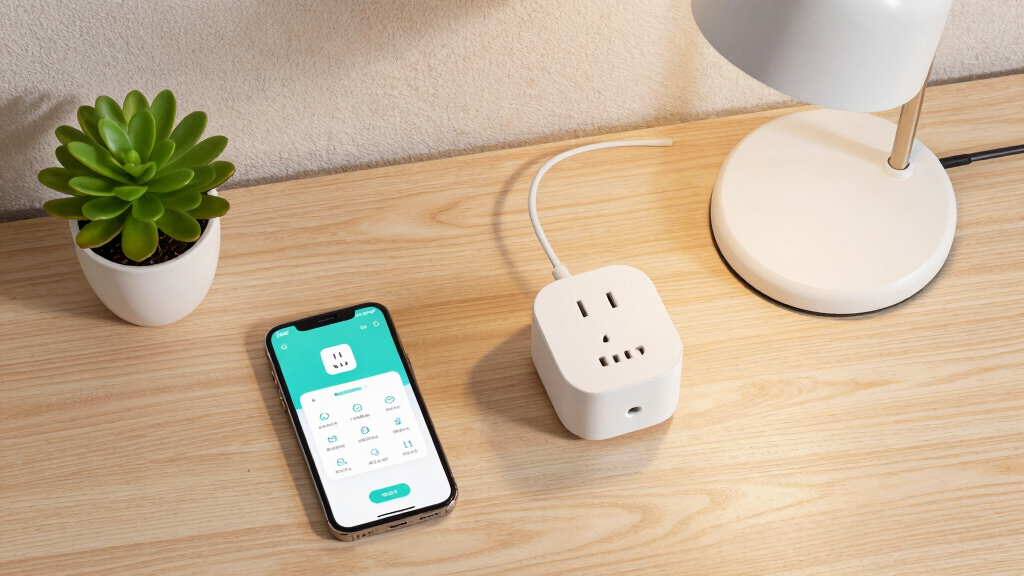
Choose compact, side-facing minis. Bulky plugs block the second outlet and are prone to accidental bumps in busy kitchens and living rooms.
A physical switch matters. Manual shutoff during surges, storms, or emergencies adds an essential layer of safety.
Do not use standard smart plugs with space heaters, window AC units, or other high-draw appliances unless explicitly rated for it — and never with medical or life-support equipment. Check the plug’s power-loss behavior: after an outage, does it return to on or off?
Five Steps From Shelf to Setup
Work through the chain in order — each step eliminates models that would frustrate or endanger the person who depends on them.
Pick Your Assistant
Alexa, Google, or Siri — the plug must speak the same language. Matter covers all three from one box.
Verify UL or ETL
Look for the mark on the box or listing. No certification means no sale, full stop.
Match the Radio
Wi-Fi for simplicity; Zigbee or Thread for local control that survives internet outages.
Confirm the Rating
Check amps and watts against the intended appliance. Stay well under the 1,800 W ceiling.
Build the Schedule
Sunset lights-on, morning coffee, away mode — automation does the remembering.
Traceability · From One Spoken Word to Peace of Mind
Key Takeaways
Remote access lets family check in or switch appliances off from anywhere — discuss consent openly, and consider energy-monitoring plugs as a camera-free way to notice that the kettle was used this morning.
Choose voice-assistant compatibility first. Effortless daily control is the entire point — for Apple households, that means HomeKit or Matter on the box.
Prioritize certifications and load ratings. Never overload a plug, and never run high-wattage appliances unless the plug is explicitly rated for them.
Opt for physical controls and simple apps. A manual button and a clean interface ensure the plug works for every user, technical or not.
Consider connectivity trade-offs. Wi-Fi for simplicity; Zigbee or Thread for more reliable local control when the internet fails.
Automate routines to support independence. Schedules, timers, and away modes deliver safety, energy savings, and peace of mind — all with zero subscription fees for core features.
Why Compatibility with Your Voice Assistant Matters Most
Smart plugs that work seamlessly with your voice assistant are game-changers. If you already use Alexa, Google, or Siri, picking a compatible plug makes daily control effortless. For example, a senior living independently can simply say, “Turn on the living room lamp,” instead of fumbling with switches.
Apple users should look for HomeKit or Matter support, ensuring their devices play nicely with Siri. Many budget models only support Alexa or Google, which might limit accessibility options.
Pairing your smart plug with a smart speaker or display — like an Echo or Nest Hub — brings voice control into your everyday routine. That’s often the real-world setup that makes the biggest difference.
affordable smart plugs for seniors
As an affiliate, we earn on qualifying purchases.
As an affiliate, we earn on qualifying purchases.
How to Pick a Plug That’s Easy to Set Up and Use Daily
Setting up a smart plug shouldn’t feel like solving a puzzle. Look for models with clear app instructions, minimal account requirements, and an intuitive interface. This ease of setup reduces frustration and ensures that even non-technical users can get their devices running quickly. Furthermore, a straightforward setup process means fewer mistakes, which can be critical for older adults or those with limited tech experience.
Physical buttons on the plug itself are a lifesaver if Wi-Fi drops or the app crashes. They provide a reliable fallback, so you can manually turn appliances on or off without fuss. This redundancy is vital for safety and reliability, especially in emergency situations.
Choose a plug that’s simple enough for non-technical users but flexible enough to integrate into routines. Once set up, daily use should just be a matter of voice commands or automatic schedules, making everyday living more seamless and less stressful.
voice-controlled smart plugs for independent living
As an affiliate, we earn on qualifying purchases.
As an affiliate, we earn on qualifying purchases.
Connectivity and Reliability — What You Need to Know
Most budget smart plugs run on 2.4 GHz Wi-Fi, which is the standard for many homes. But if your router has a dual-band setup, you might run into issues where the plug can’t connect or drops out. For example, a plug might work fine during setup but disconnect when the Wi-Fi switches to 5 GHz, creating frustration and potential safety hazards if appliances don’t turn off or on as scheduled.
Connectivity options matter a lot. Wi-Fi plugs require no hub, making setup easier, but Zigbee or Thread models need a hub or border router. These often provide more reliable local control because they communicate directly with your home’s mesh network, reducing dependence on internet stability. This can be crucial during power outages or internet disruptions, where local control ensures safety and convenience without interruption.
Consider your home’s network environment and your priorities: if you want the most reliable control during outages, investing in Zigbee or Thread devices with a compatible hub might be worthwhile. Conversely, Wi-Fi-only models are simpler but may be less dependable if your internet is unstable. Understanding these tradeoffs helps you choose the right setup for your lifestyle and safety needs.
smart plugs with safety certifications
As an affiliate, we earn on qualifying purchases.
As an affiliate, we earn on qualifying purchases.
Physical Design and Safety: What to Look For
A smart plug should fit your outlet comfortably without blocking the second socket. Look for compact, side-facing models if space is tight. In a busy kitchen or living room, a bulky plug could block other outlets or be prone to accidental bumps, which could damage the device or cause it to disconnect.
Safety certifications like UL or ETL are non-negotiable because they verify that the device has been tested to meet strict safety standards. Devices with these certifications are less likely to overheat, short circuit, or cause fires. For example, a UL-certified plug rated for 15 A (amps) ensures it can safely handle most lamps and small appliances without risk.
Be cautious with high-draw appliances like space heaters or large air conditioners. Most smart plugs aren’t rated for the high wattage they require, which can lead to overheating or electrical failures. Always check the load rating—typically around 1800 W for US models—and never overload, as this can cause fire hazards or damage to the device.
Also, consider whether the plug has a physical switch. For safety and convenience, you want the ability to turn the device off manually if needed, especially during power surges, thunderstorms, or emergencies. This manual control adds an extra layer of safety and peace of mind.
As an affiliate, we earn on qualifying purchases.
Using Schedules, Timers, and Automations to Support Daily Life
Automating routines with schedules or timers can make daily living safer and easier. For example, setting a lamp to turn on at sunset or scheduling a fan to run during the hottest hours helps create a predictable environment. This consistency is especially important for individuals with cognitive or mobility challenges, as it reduces the need for manual intervention and can help establish routines that promote safety.
For example, a caregiver might set a routine so a coffee maker turns on automatically each morning, supporting independence and reducing the risk of forgetfulness. “Away mode” can turn off appliances when no one’s home, adding a layer of security by preventing unnecessary energy consumption or potential hazards.
These automation features support fall prevention, energy savings, and peace of mind. They can be tailored to individual routines, preferences, and safety needs, ensuring that the home environment adapts to the user’s lifestyle over time. Properly configured routines can significantly reduce daily hazards and enhance comfort, especially for those with limited mobility or memory challenges.
Remote Access and Privacy — What You Need to Know
Being able to control your smart plugs from anywhere is a game-changer. Family members or caregivers can check on or turn off appliances remotely, offering reassurance and quick intervention if needed. For example, a daughter might turn off her parent’s oven if she’s concerned about safety, or a caregiver might verify that lights are off after a visit, reducing worries about forgotten switches.
But with remote access comes privacy considerations. Always discuss consent openly, especially for loved ones living independently. Many plugs offer energy monitoring, which can passively provide insights into usage patterns without cameras or invasive monitoring. This data can help identify issues like unusual energy spikes, indicating problems or safety concerns.
Remember, privacy and safety go hand-in-hand. Choose devices with secure, encrypted connections, and set permissions carefully to prevent unauthorized access. Transparent communication about how data is shared and stored helps build trust and ensures that remote control features support independence without infringing on privacy.
Cost, Subscription Fees, and Long-Term Value
Most smart plugs cost between $8 and $15 each, with no ongoing fees. This makes them an affordable way to add automation and control without breaking the bank. For example, a multipack can outfit an entire room or home area at a fraction of the cost of more complex smart home systems, providing significant value for basic automation needs.
Some advanced models with energy monitoring or outdoor ratings cost more, often $20–25. These features can provide additional safety insights or durability for outdoor use, but they should be weighed against your actual needs and budget. Be wary of models that require subscriptions for basic features, as ongoing costs can quickly add up and diminish the initial savings.
Focus on certified, reliable brands that offer ongoing support and updates. Remember, a cheap, uncertified plug might seem attractive initially but could pose safety risks or break quickly, leading to higher replacement costs. Investing in quality ensures long-term reliability and safety, which is especially important for devices supporting daily routines and safety-critical functions.
Frequently Asked Questions
Do I need a smart speaker for voice control?
Not necessarily. You can control smart plugs via smartphone apps from anywhere. But a voice assistant makes daily commands hands-free and more accessible, especially for those with mobility or dexterity challenges.Will a smart plug work if the Wi-Fi goes out?
It depends on the model. Wi-Fi-only plugs lose remote control during outages, but some Zigbee or Thread models with local routing keep working on their mesh network. Check the specs if reliability during outages matters most.Are smart plugs safe for high-wattage appliances?
Only if rated for the load. Most are designed for lamps and small appliances, typically up to 1800 W. Never use them with space heaters or large appliances unless explicitly rated for high wattage, to avoid fire risk.Can I control smart plugs remotely without a subscription?
Yes. Most models allow remote control via the app without ongoing fees. Be wary of models that lock features behind a subscription; choose certified, fee-free options.What’s the best way to introduce smart plugs to an elderly parent?
Set up the device for them first, keeping controls simple. Use voice commands or routines to reduce the need for manual operation. Explain how it makes daily life safer and easier, respecting their independence.Conclusion
A well-chosen smart plug is more than a gadget — it’s a bridge to safer, more independent living. Think about your current setup, safety needs, and daily routines. The right device can turn your home into a smarter, more supportive space that respects dignity and promotes confidence.Fall Picks
fall essentials
As an affiliate, we earn on qualifying purchases.